A walkthrough you can follow on your own machine. Start the demo portal, work on it from VS Code, take the simulation apart, build a feature, connect your own export, preview changes on a deployed portal, then debug, test and automate.
Every step shows the screen first, as a short clip or a still from the recordings. Then it says what to do, what you should see, why it works that way and what to check before you move on. The documentation is the reference; this page is the path through it.
BEFORE YOU START
Two tools. One export.
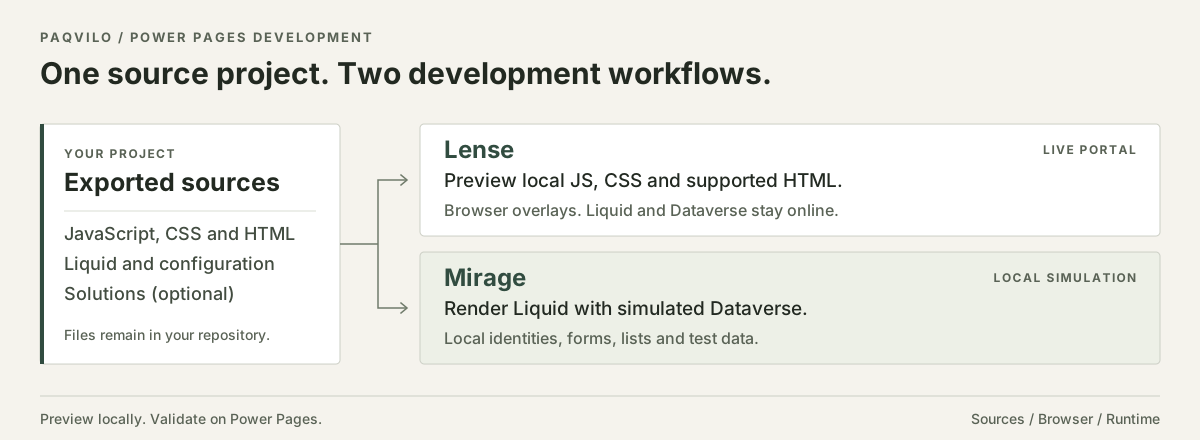
There is no local runtime for a Power Pages portal. To see a Liquid change, a form tweak or a permission fix you normally upload it with pac pages upload, wait, refresh and try again, and to see what a reader sees you need a second account and an environment you are allowed to change. Paqvilo shortens that loop in two ways, both reading the same input: the PAC export of your site, plus optional unpacked Dataverse Solutions.
Lense and Mirage compared
Lense
Mirage
Where the portal runs
Online, on your deployed environment
On your machine, on a loopback port
What runs locally
JavaScript, CSS, images and supported literal HTML, overlaid in a dedicated browser
Liquid, web templates, basic forms, lists, the portal Web API and table permissions, rendered from the export
Data and sign-in
Live Dataverse and the portal's own sign-in
Simulated Dataverse rows and invented personas
Both share the catalogue file paqvilo.config.yml, the source model and the in-browser panel with Inspect. Neither deploys: PAC CLI and your pipeline still do that. Paqvilo is an independent open-source project with no Microsoft affiliation.
You need four tools. The guide uses VS Code and Edge throughout.
Editor for the export, the catalogue and your data pack; F5 debugging.
CHOOSE YOUR ROUTE
Pick a starting point. Tick off the steps.
New to Paqvilo? Start with the demo; it needs no portal, export or account. Already have an export? Take the second route. Need to see local changes against the real backend? Take the third. Each step links to the part of the guide that walks through it; your ticks stay in this browser.
If PowerShell blocks npm.ps1, choose Command Prompt from VS Code's terminal dropdown and run the same commands.
Close the dedicated browser or press Ctrl+C. Server-side changes still go through your normal deployment.
01 / START THE DEMO
A complete portal from one command.
You install Paqvilo into an empty folder and start the bundled demo: an invented Power Pages project with native forms and lists, a Web API workspace, PCF controls, Liquid examples, server logic and a data pack. You need no Power Pages licence, no portal export and no Microsoft account.
Prepare your computer
Do Install Node.js 22 or later, Edge or Chrome, Git and VS Code. Reopen VS Code after installing Node.js so its terminal sees the new PATH, then open Terminal › New Terminal and run each line separately:
node --version
npm --version
Check Both commands print a version number. If either says it is not recognised, close every terminal and VS Code window and open them again.
Install into a working folder
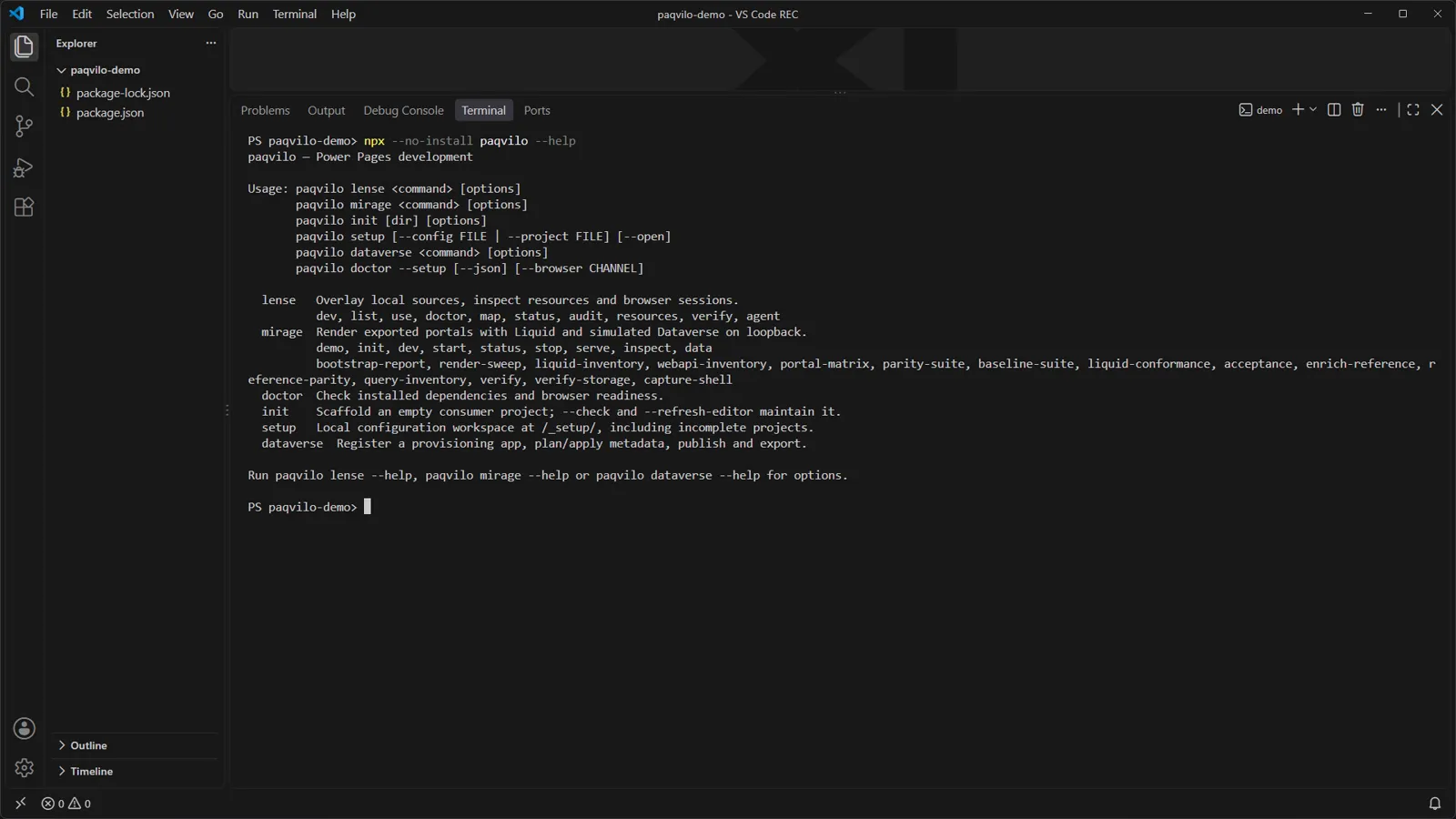
The installed copy answers --help with its six commands.
Do Create an empty folder, open it in VS Code (File › Open Folder) and run:
You see npm reports the packages it added, and --help lists the commands lense, mirage, init, setup, dataverse and doctor. Under mirage you find demo, init, dev, start, status, stop, serve, inspect and more.
Whynpm init -y writes package.json, the project's list of tools. npm install --save-dev paqvilo downloads Paqvilo into node_modules/ and records it as a development tool; one install covers both Lense and Mirage. npx --no-install paqvilo runs exactly that installed copy: --no-install makes npx fail instead of fetching some other version from the registry.
Check Commit package.json and package-lock.json and use npm ci for repeatable installs. Ignore node_modules/ and .paqvilo/ in Git. Installation needs internet access; nothing else does.
Start the demo
One command in the VS Code terminal; the demo opens in a dedicated Edge window.
Do In the same terminal, run:
npx --no-install paqvilo mirage demo
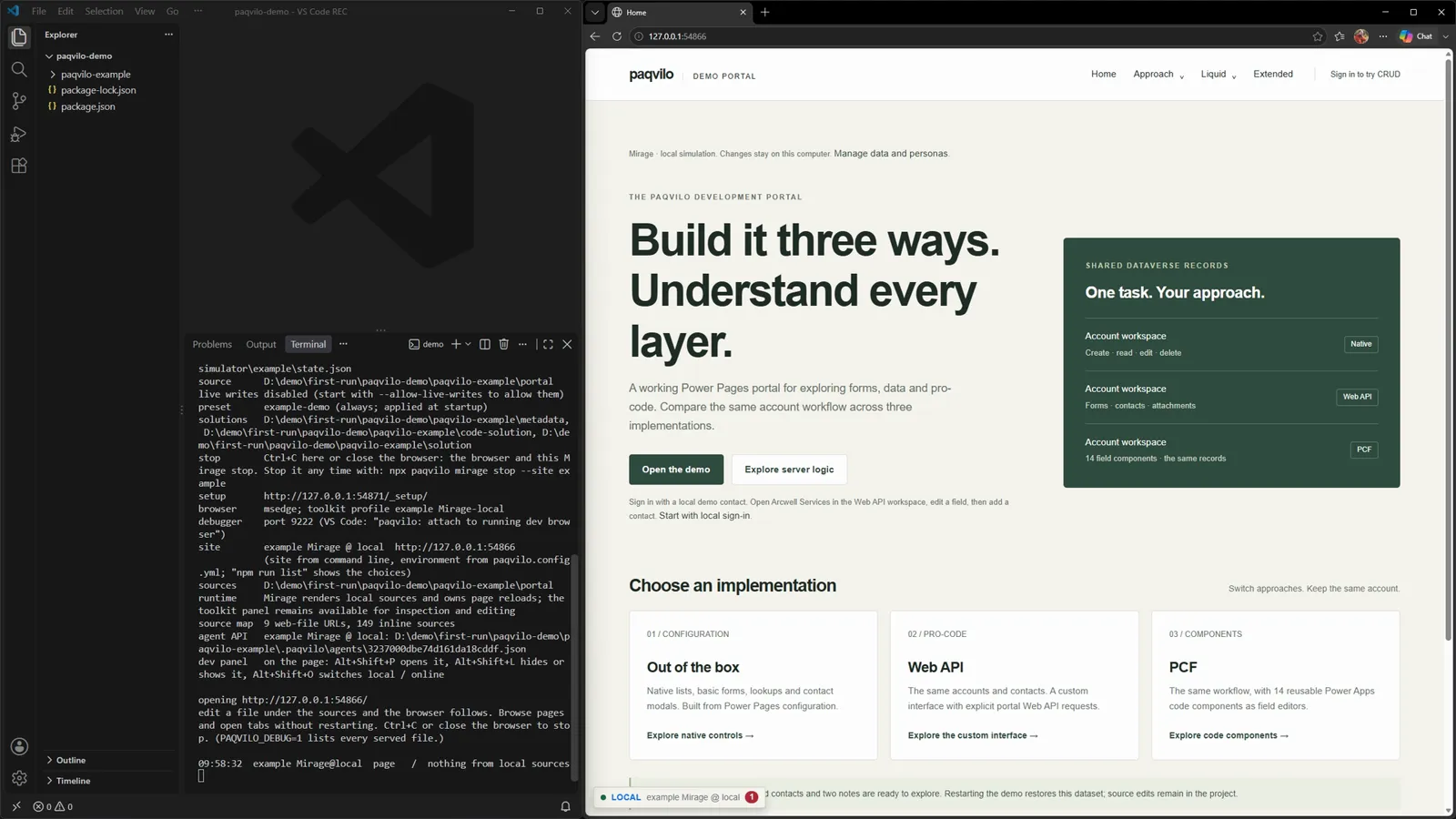
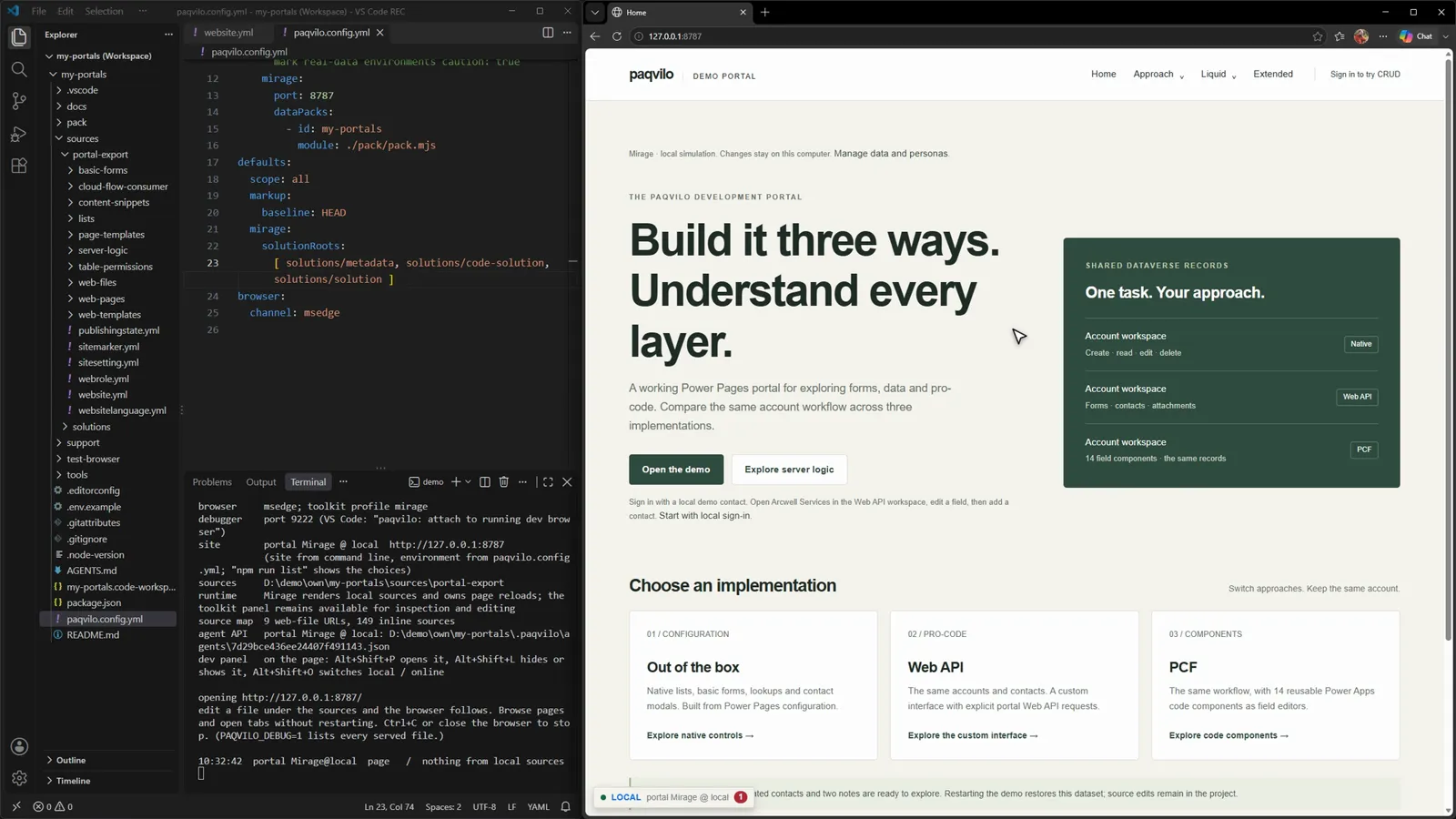
You see A paqvilo-example folder appears in the Explorer, the terminal prints a session summary and Edge opens Home at http://127.0.0.1:<port>: "Build it three ways. Understand every layer." The summary includes live writes disabled, preset example-demo (always; applied at startup), a /_setup/ URL, a source-map count, the agent API discovery file and the panel shortcuts.
Why The command copies an editable project into paqvilo-example/: the PAC export under portal/, unpacked Solutions, the data pack, tests and deployment archives. It refuses to overwrite an unrelated folder that is not empty. Then it runs mirage dev for the site example on a free loopback port with the preset example-demo, which is applied at every start. That is why each demo start restores the sample data while your source edits stay. Edge runs with its own toolkit profile, separate from your everyday browser.
Check Home lists three implementations of one task: Out of the box (native lists and forms), Web API (a custom workspace) and PCF (code components), all on the same 12 accounts, 24 contacts and two notes.
The terminal summary on the left; the demo portal, rendered locally by Mirage, on the right.
Keep the terminal running while you work. For Chrome, add --browser chrome; for a second copy, add --dir ./another-demo. To stop, close the demo browser or press Ctrl+C.
02 / SIGN IN AND EDIT DATA
An invented user. A real write.
The demo's workspaces need a signed-in contact. Locally, signing in means choosing an invented contact from the simulated data: nothing authenticates you and no credentials are used.
Choose a local persona
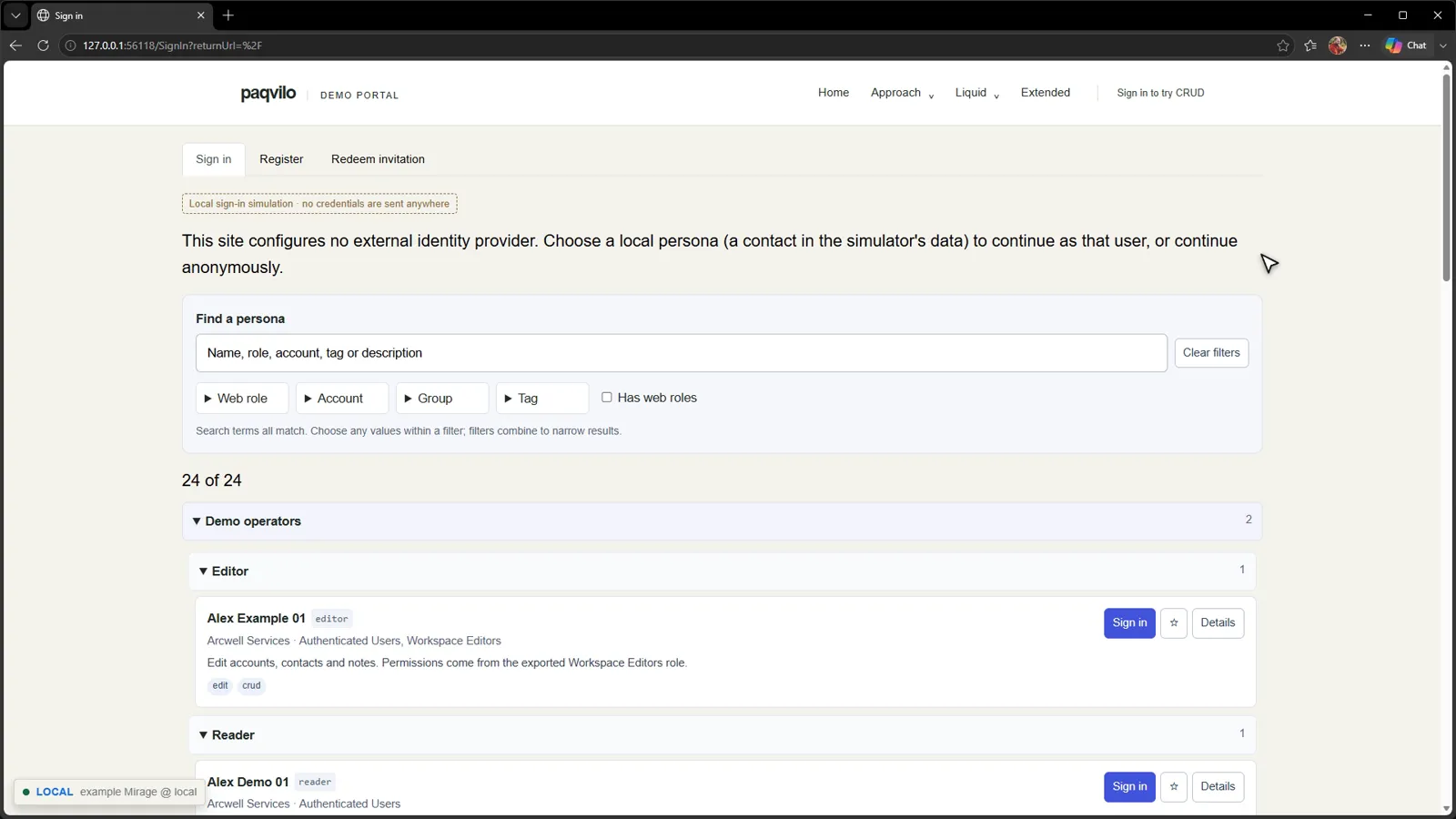
The export's own sign-in: no external provider, so Mirage lists local personas.
Do Click Sign in to try CRUD in the header, then Sign in beside Alex Example 01.
You see A label "Local sign-in simulation · no credentials are sent anywhere", a persona search with filters for web role, account, group and tag, and the demo operators: Alex Example 01 (editor) and Alex Demo 01 (reader), out of 24 contacts.
Why The demo export enables local accounts and configures no external identity provider, so Mirage offers the contacts in its local data. Choosing one gives this browser a session cookie for this runtime. The exported web roles of that contact decide what it may do. Chapter 5 switches this page to a simulated Microsoft Entra sign-in.
Check The header now shows Alex Example 01 and Sign out.
Change a record and reload
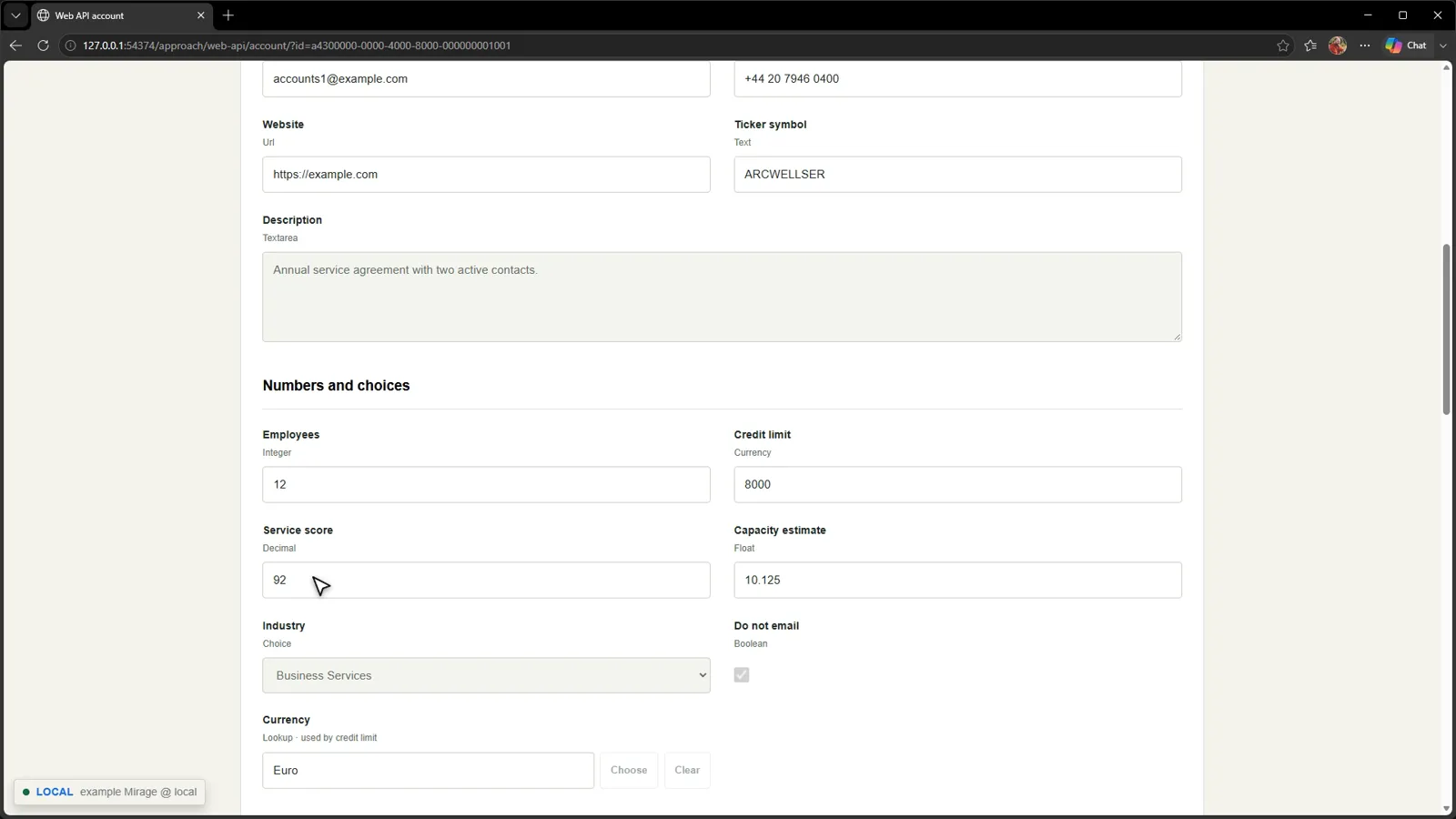
Service score 68.25 becomes 92; Save account writes it.
Do Click Open the demo (the Web API workspace), then Arcwell Services and Edit account. Set Service score to 92, scroll to Save account and click it. Reload the page.
You see The account form groups typed fields: text, URL, integer, currency, decimal, float, choice, boolean and lookups. After the save and the reload, Service score still reads 92.
Why The workspace's JavaScript writes through the portal Web API, and Mirage answers /_api/accounts from its local tables with permission checks. The value lives in this runtime's state, so Out of the box and PCF show the same record with the new score.
Check Reload once more; the score stays. Then try the rest of the walkthrough on the page: add a related contact and edit or delete it in its dialog, open PCF to edit the account through 14 typed controls, and click Calculate on server on Extended.
After the reload: the saved value came back from Mirage's local data.
03 / INSPECT AND X-RAY
From the page back to its sources.
Two tools answer "where does this come from?". Inspect lists the sources and exported rules behind the whole page; X-ray names the likely source of one element under your pointer. Both work the same in Mirage and in Lense.
Inspect the page
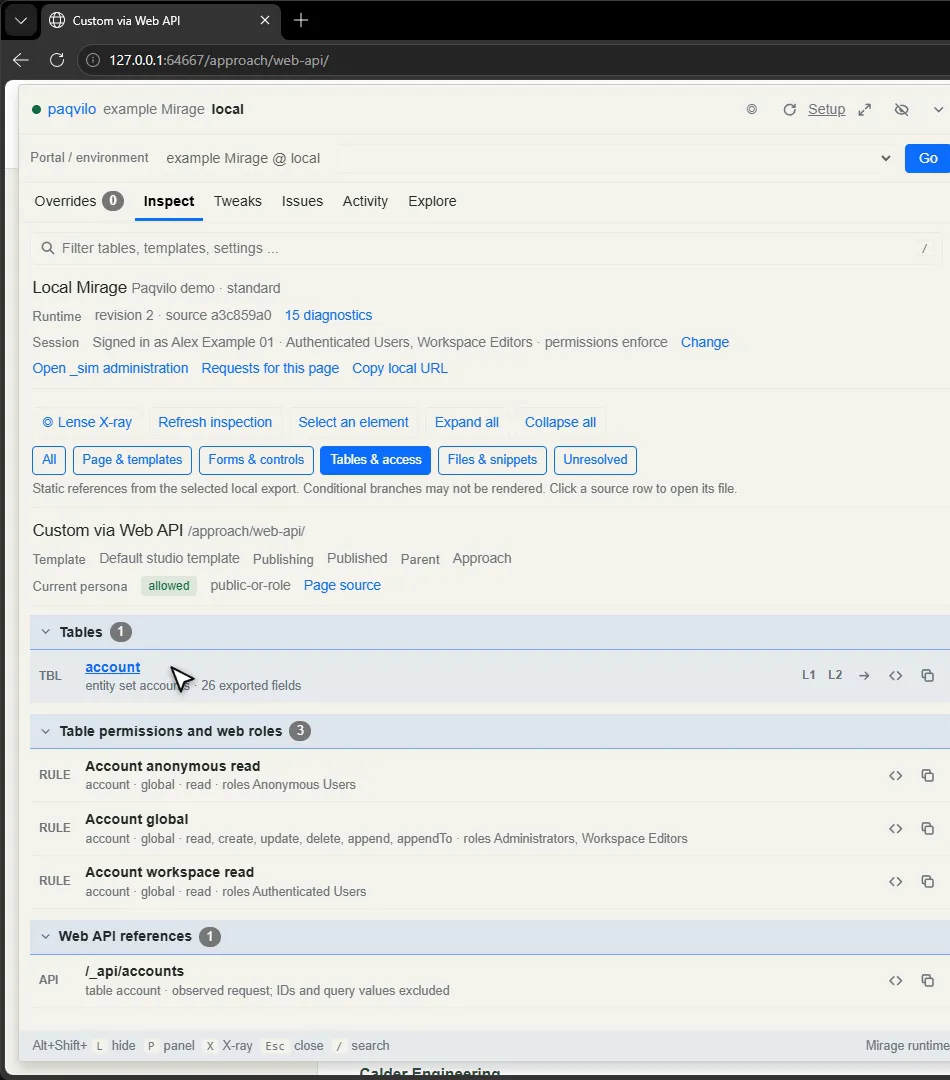
Inspect › Tables & access on the Web API page.
Do On the Web API page, press Alt+Shift+P, choose Inspect, then the filter Tables & access.
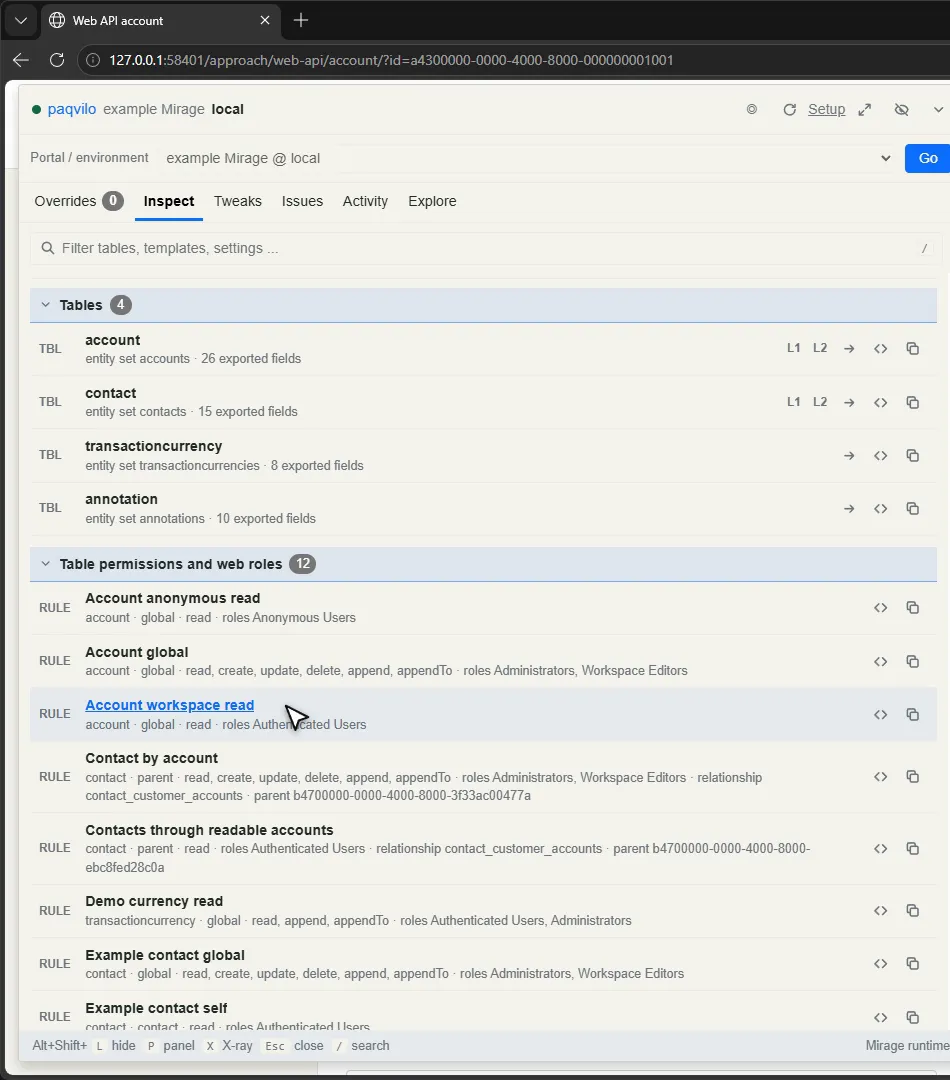
You see The runtime ("Local Mirage"), your session ("Signed in as Alex Example 01 · Authenticated Users, Workspace Editors · permissions enforce") and filters for Page & templates, Forms & controls, Tables & access and Files & snippets. Under Tables & access: the account table with 26 exported fields, three exported rules (Account anonymous read, Account global with read, create, update, delete, append and appendTo for Administrators and Workspace Editors, and Account workspace read for Authenticated Users) and the Web API reference /_api/accounts.
Why Inspect reads the map between the rendered page and the export: page sources, the template chain, forms, tables, rules, files and snippets. Clicking a source row opens the file in your editor (chapter 4).
Check Read the note under the filters: "Conditional branches may not be rendered." Inspect lists static references from the export; it does not prove which Liquid branch ran. An exported rule is not proof that a live user has that access.
X-ray an element
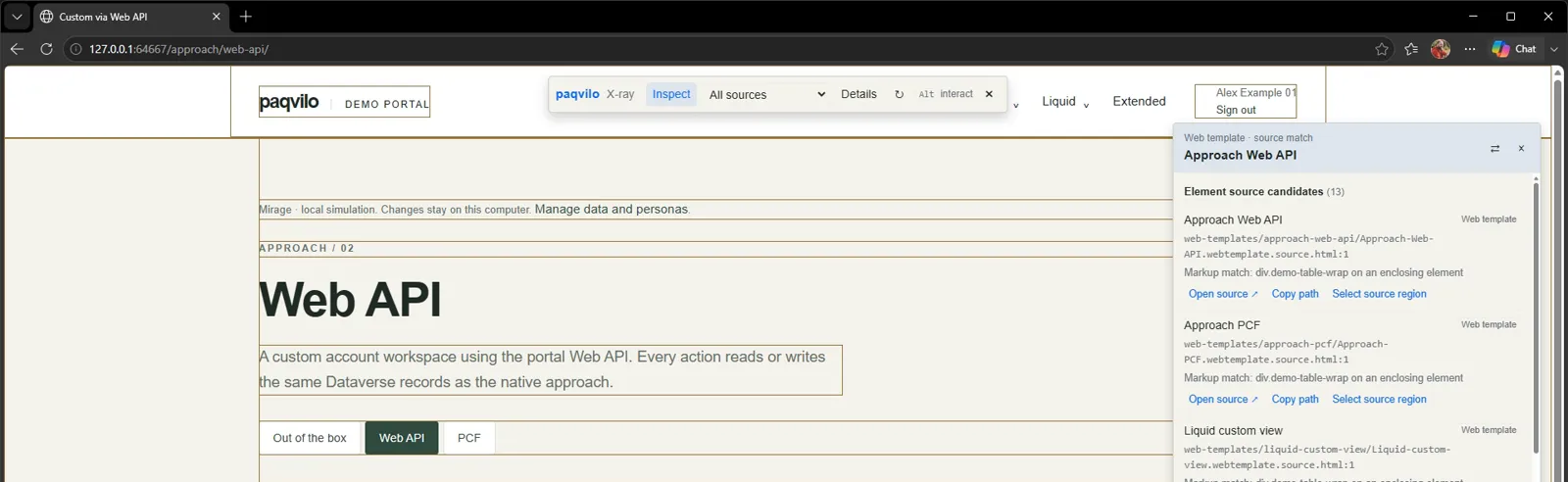
The X-ray card for the Arcwell Services link: 13 candidates, best first.
Do Press Alt+Shift+X (or ◎ Lense X-ray in Inspect). Hover over the page, then click the Arcwell Services link.
You see Outlines on the page: green for controls, blue for form and view containers, amber for source markup. The click selects the link instead of following it. The card reads "Web template · source match", Approach Web API, with 13 element source candidates; the first is web-templates/approach-web-api/Approach-Web-API.webtemplate.source.html with "Markup match: div.demo-table-wrap on an enclosing element". Each candidate offers Open source, Copy path and Select source region.
Why X-ray indexes markup hints across the sources the page references and matches elements by static IDs, classes and component attributes, not by positional DOM paths. The account link itself is written by the workspace script at runtime, so X-ray matches the enclosing template markup. Other templates share that markup, which is why there are several candidates. Treat the first as the place to start reading, not as proof of the deployed revision.
CheckOpen source opens the template at the matching line. Hold Ctrl or switch to Interact to use the page normally; [ and ] cycle overlapping elements; Escape releases the selection, then exits X-ray. X-ray does not change portal styles or submit selected controls.
04 / WORK FROM VS CODE
F5, a jump to the file, and the page follows.
For daily work you want the demo as a VS Code workspace: tasks and a debugger behind F5, Inspect opening files in the editor, and the browser following every save.
Prepare the workspace
Do In your working folder, run:
npx --no-install paqvilo mirage demo --scaffold
You see The command prints where it created the demo, tells you to open paqvilo-demo.code-workspace, to select "Demo: Mirage and browser debugger" in Run and Debug and to press F5, and ends with "No runtime was started. Source edits stay in the demo folder."
Why--scaffold copies the same project as the plain demo command and stops. Its editor files are:
.vscode/tasks.json: demo: Install dependencies, demo: Start Mirage, demo: Mirage + browser debugger, demo: Lense + browser debugger, demo: Build Dataverse plugins and demo: Run acceptance tests. The Mirage tasks run the project's own copy of Paqvilo with --port 0; the debugger variant adds --debug-port 9222.
.vscode/launch.json: Demo: Mirage and browser debugger, Demo: Lense and browser debugger and Demo: Attach to the running browser.
paqvilo-demo.code-workspace: hides .paqvilo and node_modules from the Explorer and search and opens the debug view only on a break.
package.json scripts: dev, dev:debug, lense, configure and test.
Press F5
One key: dependencies, the runtime, the browser and the debugger.
DoFile › Open Workspace from File, select paqvilo-example/paqvilo-demo.code-workspace. In Run and Debug, keep Demo: Mirage and browser debugger selected and press F5.
You see The task terminal runs npm install, then mirage dev … --port 0 --debug-port 9222. Edge opens Home; the Call Stack shows the page as running and the status bar names the configuration.
Why The launch configuration attaches to a browser; it does not start one. Its preLaunchTask runs demo: Mirage + browser debugger, which depends on demo: Install dependencies, so the first F5 also installs the demo's packages. Mirage starts on a free loopback port and launches Edge with debugging port 9222 open. The task runs in the background; VS Code waits for Mirage's browser-ready line ("edit a file under the sources and the browser follows.") and then attaches.
Check If port 9222 is taken, change it in both the task and the launch configuration. Run one development session per browser profile.
Open a source from Inspect
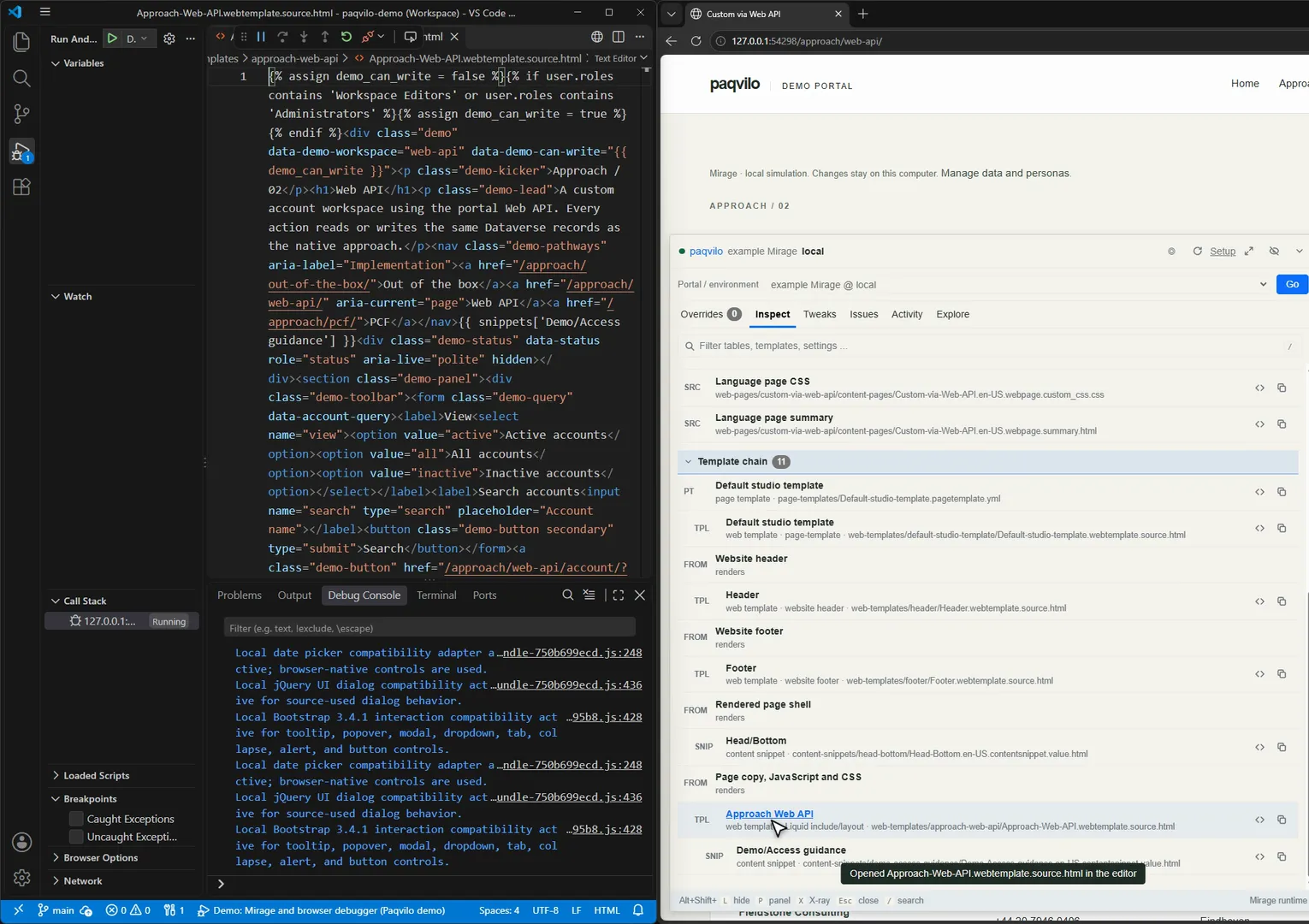
One click on a template row, and VS Code opens the file.
Do Click Open the demo, press Alt+Shift+P, choose Inspect and the filter Page & templates. In the Template chain, click Approach Web API.
You see The page source files (the language page, its copy, JavaScript, CSS and summary) and the template chain: the Default studio page template and web template, Header, Footer, the Head/Bottom snippet and Approach Web API. VS Code opens Approach-Web-API.webtemplate.source.html and the panel confirms "Opened Approach-Web-API.webtemplate.source.html in the editor".
Why Paqvilo opens files with your editor command as <command> -g file:line. The default is code. If yours differs, or Inspect cannot open the editor, set the top-level editor in paqvilo.config.yml or PAQVILO_EDITOR to the editor's CLI or full path, then restart the session.
Check The template's first line is Liquid: it assigns demo_can_write from user.roles. That decides which buttons render; chapter 5 shows the other half of the permission story.
Know what is in the project
The catalogue ties the export, the Solutions and the data pack together.
Demo project layout
Folder or file
What it is
portal/
The PAC portal export: web pages, web templates, content snippets, lists, basic forms, server logic, table permissions, web roles and site settings.
The data pack: pack.mjs, fixtures.json and dataverse-plugins.mjs.
components/, deployment/
PCF and C# plugin sources, and importable deployment archives.
test/, baseline/
Acceptance tests and baseline material.
paqvilo.config.yml
The catalogue.
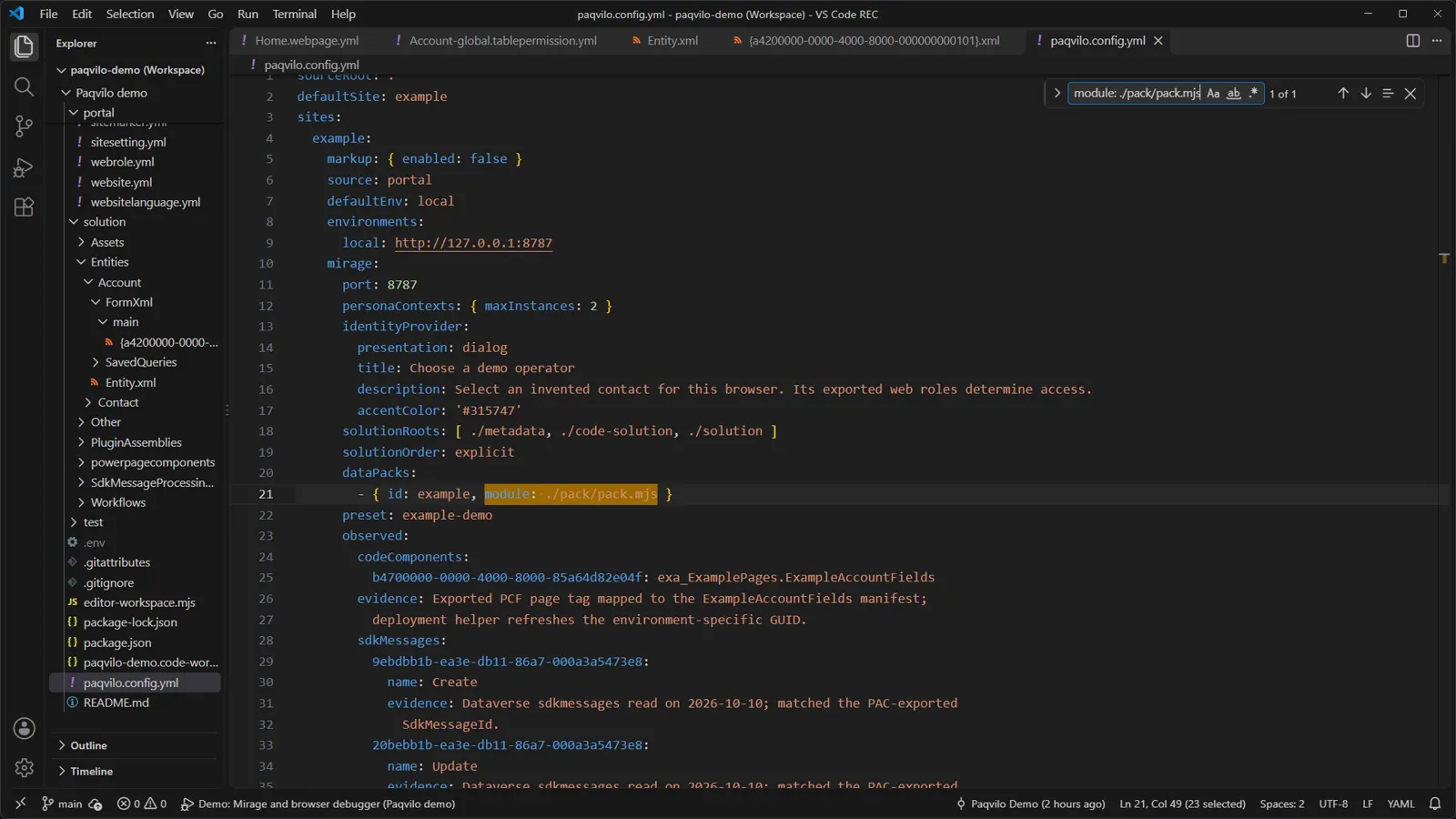
Why A table permission is an ordinary YAML record from the export: Account global has adx_scope: 756150000 (global), create, read, write, delete, append and appendto, and two web role IDs. The catalogue's site example names the export (source: portal), the Solution roots in an explicit order, the pack (dataPacks: [{ id: example, module: ./pack/pack.mjs }]), the seed (preset: example-demo) and observed facts that an export cannot carry, each with its evidence. Packs are never discovered automatically; registering one means you trust its code, because loading it executes it.
Checkport: 8787 is the catalogue default, but the demo's scripts and tasks pass --port 0 for a free port: CLI options win over the catalogue.
Edit, save, and the page follows
--demo-forest from #314c40 to #4b3aa8; the page reloads with the new colour.
Do With a session running (F5, or npm run dev in the workspace terminal), press Ctrl+P, open portal/web-files/demo.css, replace #314c40 with #4b3aa8 in --demo-forest and save.
You see A toast "Saved · demo.css", and the green panel and buttons on Home turn purple. The terminal logs changed web-files/demo.css (Mirage owns page reloads).
Why Mirage watches the export, the Solution roots and mapped plugin sources. It waits for the write to finish, debounces for 250 ms, re-imports the sources and recompiles mappings, schemas and the permission model. A broken source keeps the previous state and records a RELOAD_FAILED diagnostic. Every rendered page holds a Server-Sent Events connection to /__sim/events; Mirage sends reload and the page reloads.
Check Change the colour back and save; the page follows again. To stop, close the development browser or press Ctrl+C. Under F5, disconnecting the debugger leaves the browser running, so close it before you start another session.
05 / THE MIRAGE SIMULATION
Who you are, what you may do, which rows exist.
A local portal is useful when you control four things: who the browser is, what that identity may do, which rows exist and what the backend does on a write. Mirage lets you change all four at runtime without touching the export. Most of it happens in /_sim/, the loopback administration workspace titled Portal Studio; open it from Manage data and personas on any demo page. It opens in its own tab.
Make sign-in match your live site
One configuration preset and one site-setting override in /_sim/.
Do
In /_sim/, open Platform rules. Under Configuration presets, choose Simulated Microsoft Entra sign-in · pack: example and click Apply preset.
Open Settings & snippet overrides, filter for LocalLoginEnabled and click Set False on Authentication/Registration/LocalLoginEnabled.
Click Open portal, then Sign in.
You see After step 1, the active preset reads "Simulated Microsoft Entra sign-in" and the site settings list the Authentication/OpenIdConnect/AzureAD/… values as local overrides. After step 2, the row shows effective value False, source value true and origin Local override.
Only the simulated provider remains; "editor" narrows 24 personas to one.
You see The sign-in page now offers one button, Demo Microsoft Entra. It opens the operator dialog "Choose a demo operator", which says it signs in "with Demo Microsoft Entra (AzureAD) · local simulation, no credentials are used". Typing editor shows "1–1 of 1 matching personas · 24 available"; Continue as Alex Example 01 lands on Home, signed in.
Why Each runtime starts a local identity provider on its own loopback port, cross-origin to the portal like an online provider. It serves OpenID Connect discovery, signing keys, authorize, logout, token and userinfo endpoints, answers with an RS256 id_token and redirects only to its registered reply URL. It lists active local contacts, never imitates an online sign-in screen and mints no tokens for a real environment. The provider settings come from the data pack, not the export:
// Local simulation configuration; never part of the deployable portal export.
const entraSettings = {
'Authentication/Registration/ExternalLoginEnabled': 'True',
'Authentication/Registration/AzureADLoginEnabled': 'True',
'Authentication/OpenIdConnect/AzureAD/Caption': 'Demo Microsoft Entra',
'Authentication/OpenIdConnect/AzureAD/ClientId': 'paqvilo-demo-local',
'Authentication/OpenIdConnect/AzureAD/ExternalLogoutEnabled': 'True',
};
configurationPresets: [{ id: 'example-entra', name: 'Simulated Microsoft Entra sign-in',
portalOverrides: { settings: entraSettings } }],
The preset does not touch LocalLoginEnabled; that is why step 2 exists. A configuration preset replaces only platform rules and setting and snippet overrides; records, personas, roles and source files stay as they are. Save current overrides names the current set, Export selected JSON moves it to another runtime, and Source defaults returns to the export. Scripts use the same loopback API through connectRuntime in paqvilo/mirage/testing.
Check The export did not change: both edits are overrides held in this runtime's state. The rest of the guide signs in through this simulated provider.
Same record, two people
Alex Example 01, the editor.Alex Demo 01, the reader.
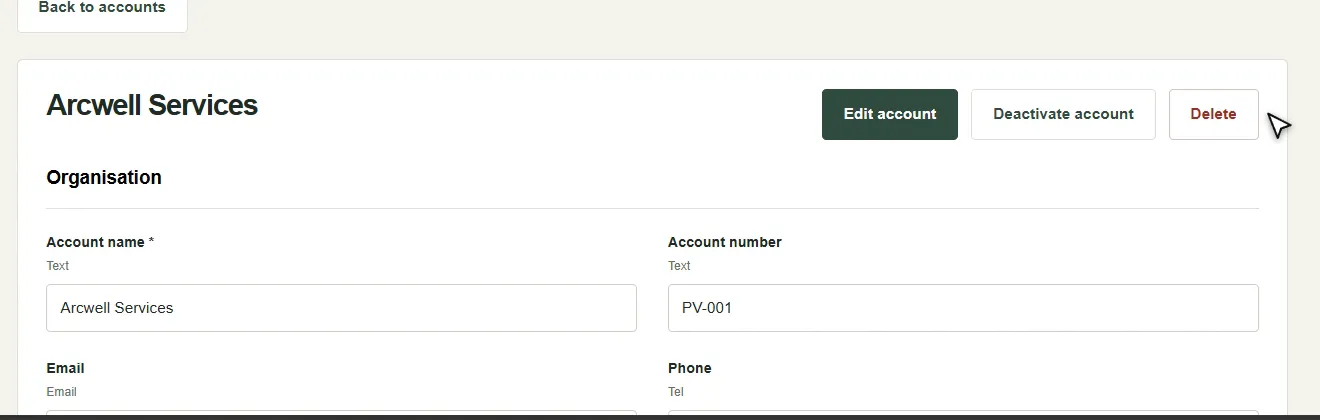
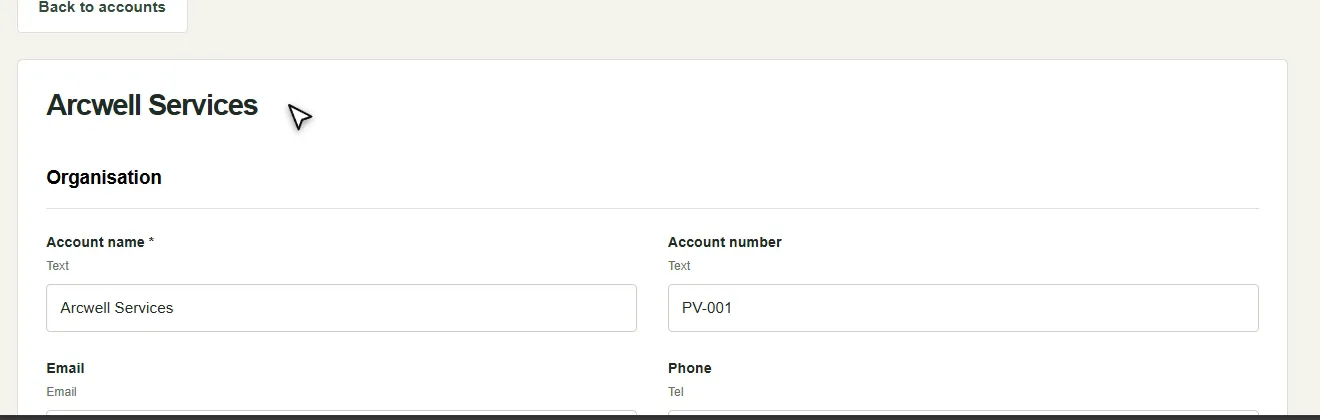
Do As Alex Example 01, open Web API › Arcwell Services. Sign out, sign in through Demo Microsoft Entra, type reader, continue as Alex Demo 01 and open the same account.
You see The editor gets Edit account, Deactivate account and Delete. The reader sees the same record without them.
Inspect › Tables & access: four tables and 12 exported rules.
Why Three inputs decide what a request may do. The identity: every portal request (pages, Liquid, FetchXML, /_api, forms) takes it from this runtime's session cookie and is anonymous without one. The roles: the export supplies web roles and table permissions; the pack only says which contact gets which role, here personaRoles gives Workspace Editors to the first contact. Enforcement: the preset sets permissionSource: 'exported' and permissionMode: 'enforce', so exported permissions, web roles and parent, contact, account and self relationships control queries and writes. For FetchXML reads, Mirage compiles the effective grants into permission joins and a filter before the query runs.
The hidden buttons and a denied write are two layers. The template's Liquid decides what to render from user.roles; the Web API decides what to accept. Account global grants full access to Administrators and Workspace Editors; Account workspace read grants read to Authenticated Users, which is all the reader has.
Check In Inspect, the reader's rows are the same exported rules. An exported table permission is not proof that a live user has access: live role assignments are not in the export.
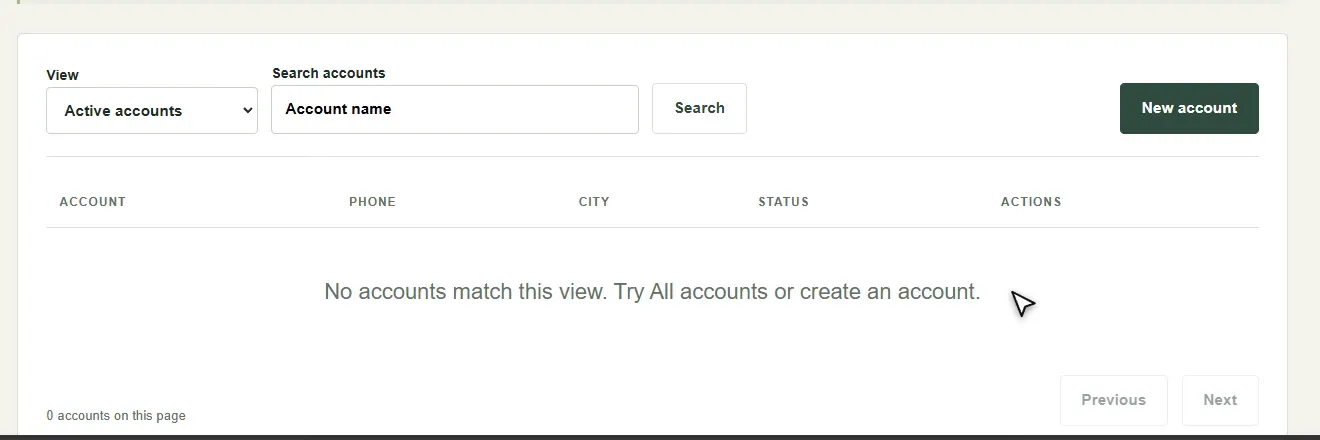
Repeatable data with presets
An empty state on demand, still signed in.
Do In /_sim/, open Plugins & presets. Click Apply on Empty account workspace, confirm, and refresh the portal tab. Then apply Populated account workspace.
You see "Preset applied." in Portal Studio, then "No accounts match this view." in the workspace. The populated preset brings the 12 accounts back.
Why Of the six simulation presets, four are generic toolkit presets (such as Open sandbox in permissive mode and Strict table permissions in enforce mode) and two come from the demo pack's presets(). Unlike a configuration preset, a data preset "can replace records, identity, roles, and backend rules". The empty preset keeps the editor and reader contacts, so you stay signed in. In the catalogue, preset picks the seed; presetMode: bootstrap keeps an existing state, always reapplies the seed at every start.
Check After the populated preset, the list shows Arcwell Services again. Tweaks offers the same presets in the panel.
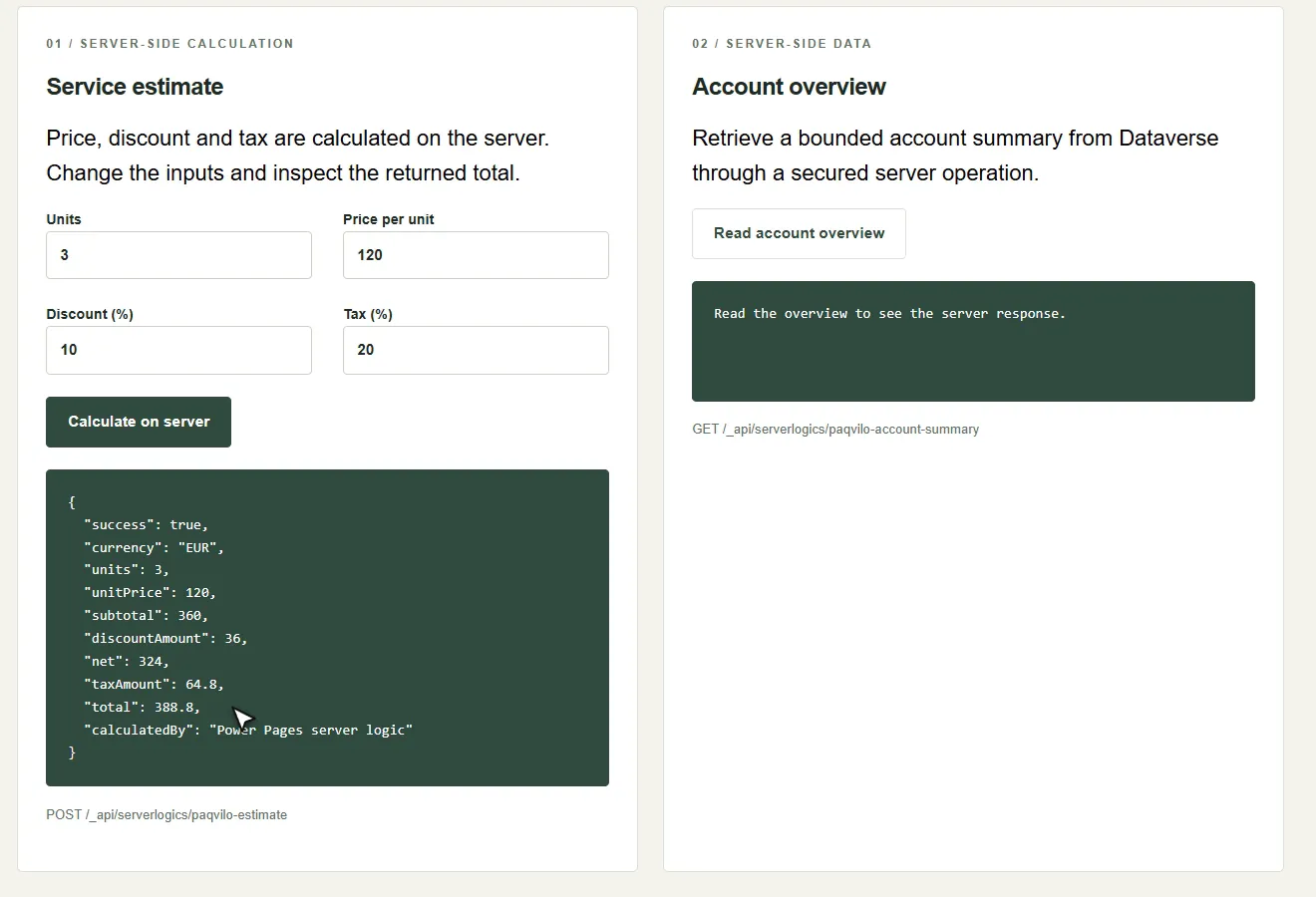
Run backend operations, or mock them
The exported server logic, running locally: "total": 388.8.
Do On Extended, click Calculate on server (3 units at 120, 10% discount, 20% tax).
You see The page posts to /_api/serverlogics/paqvilo-estimate and shows "total": 388.8, "calculatedBy": "Power Pages server logic".
Why In /_sim/, Backend operations lists paqvilo-estimate with its source, portal/server-logic/paqvilo-estimate.js, and Local behavior set to Trusted project handler: the pack's handler runs the exported code against local data (serverLogics: { 'paqvilo-estimate': ({ runExportedServerLogic }) => runExportedServerLogic() }).
Switch to Configured response, type the JSON you want, and the same button returns it.
Do Set Local behavior to Configured response, change total in the mock body to 999, click Save local behavior, then Calculate on server again on Extended.
You see "Local operation saved.", then "total": 999 and "calculatedBy": "Local mock in Mirage". The mock body in the recording also carries a zero discount, so more than the total differs.
Local behavior choices
Local behavior
What happens
Placeholder (501)
HTTP 501 names an operation with no local implementation.
Disabled locally
Skips it deliberately; the choice is traced.
Configured response
Returns your JSON body and status; 400 or above simulates a failure.
Execute exported definition
Explicitly runs the exported code or supported flow actions.
Trusted project handler
Runs a handler that a registered pack supplies.
CheckUse source default removes your override. Exported web-role grants still apply to a mocked route, and a mock tests the page, not the operation's business logic or its connectors. Mirage never forwards a flow definition to Power Automate; unsupported connectors and expressions need a per-action mock or a disabled choice.
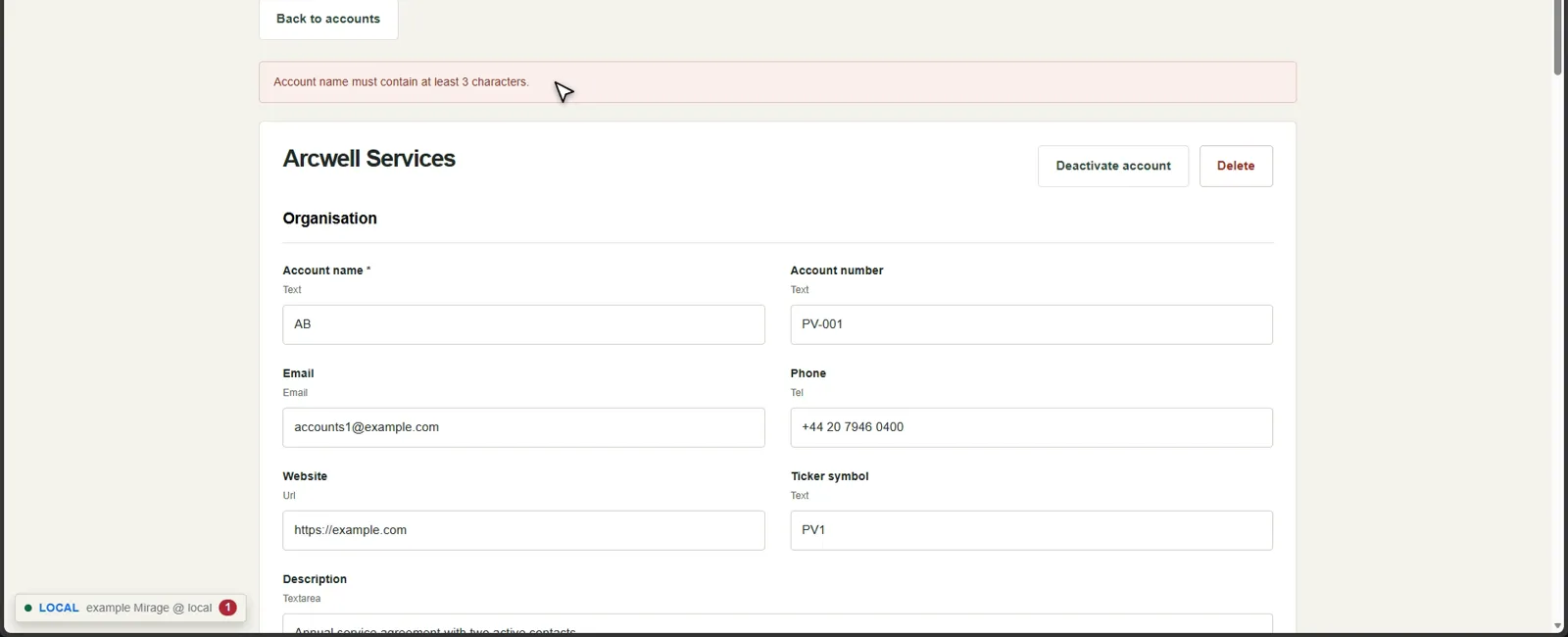
Plugins: a local model per step
The write is rejected the way the exported validation step rejects it.
Do Edit Arcwell Services, set Account name to AB and click Save account.
You see "Account name must contain at least 3 characters."
Why The Solution registers a synchronous PreValidation step (stage 10, mode 0) for a C# plugin. Mirage reads the assembly, type and step registrations from the Solution, but by default it does not run the compiled assembly. The pack maps each exported step ID to a JavaScript model instead:
// Explicit local models for the exported C# registrations. Mirage does not execute .NET.
function validateAccount({ target, reject }) {
if (supplied(target, 'name') && (!target.name || trimmed(target.name).length < 3))
reject('Account name must contain at least 3 characters.');
}
export const pluginSteps = { 'b4700000-0000-4000-8000-370000000100': validateAccount, /* … */ };
Check Each step's mode is a choice: placeholder (CRUD continues with a diagnostic), JSON mock, trusted project handler, disabled or, on Windows, the original CLR assembly. That last mode needs an explicitly trusted descriptor and an external Xrm SDK, and it is not a sandbox. A plugin model is not Dataverse: verify the deployed plugin online.
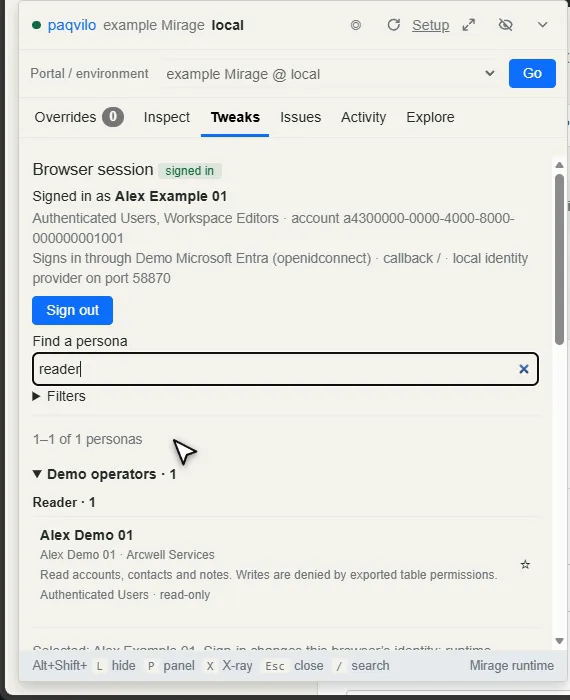
Switch persona without leaving the page
Tweaks › Find a persona: "reader".Table permissions, scenarios and presets.
Do Signed in as the editor on Arcwell Services, press Alt+Shift+P and open Tweaks. Type reader in Find a persona, choose Alex Demo 01, then Sign in as Alex Demo 01.
You see The Browser session card names this browser's identity and says it "Signs in through Demo Microsoft Entra (openidconnect)". After the switch you are back on the same account page as Alex Demo 01, without Edit account.
Why Tweaks runs the portal's own sign-in flow through the simulated provider and returns to the same URL. Only this browser changes; other browsers keep their own sessions. Local sign-in stores an HttpOnly cookie named after the runtime's port, paqvilo-mirage-auth-<port>, which keeps each runtime's session apart on 127.0.0.1.
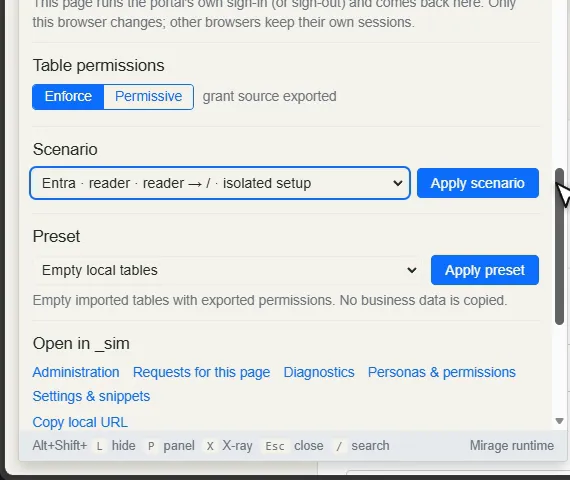
Check Further down, Table permissions switches between Enforce and Permissive ("grant source exported"), Preset applies a data preset and Scenario lists the pack's isolated setups, such as "Entra · reader · reader → / · isolated setup". Choosing a scenario only selects it; Apply scenario starts a separate runtime from a snapshot of this one, with its own cookie, state and origin and with live writes disabled. The demo allows two such copies (personaContexts: { maxInstances: 2 }).
The settings behind all of this
Mirage catalogue keys
Key under sites.<id>.mirage
What it controls
dataPacks
Trusted pack modules: data presets, personas, scenarios, handlers.
preset, presetMode
Which data preset seeds the state, and whether it is reapplied at start.
presetConfiguration
data-only (default) or apply the data preset's linked configuration preset.
identityProvider
The local provider's title, presentation and new-user choice.
personaContexts
How many isolated scenario copies may run.
platform
Simulated platform controls, also under Platform rules.
observed
Evidenced facts an export cannot carry.
Restart running previews after you change the catalogue; /_sim/ overrides apply at once. Mirage implements selected platform contracts; check the capabilities page before you rely on a feature.
06 / BUILD A FEATURE
A table, a page, a list, forms and permissions.
A real feature touches every layer. Here you add "Service requests" to the demo on a Git branch: account teams log requests with a title, account, priority, due date and description; editors create and edit them, readers only see them. The table is pqvd_servicerequest, because pqvd is the demo Solution's publisher prefix. You watch each layer arrive in Mirage, try it as both personas and commit, with no environment and no upload.
1. A branch, and the table as a manifest
dataverse/manifest.json on the new branch.
Do In the demo folder (a Git repository with your baseline on main):
git switch -c feature/service-requests
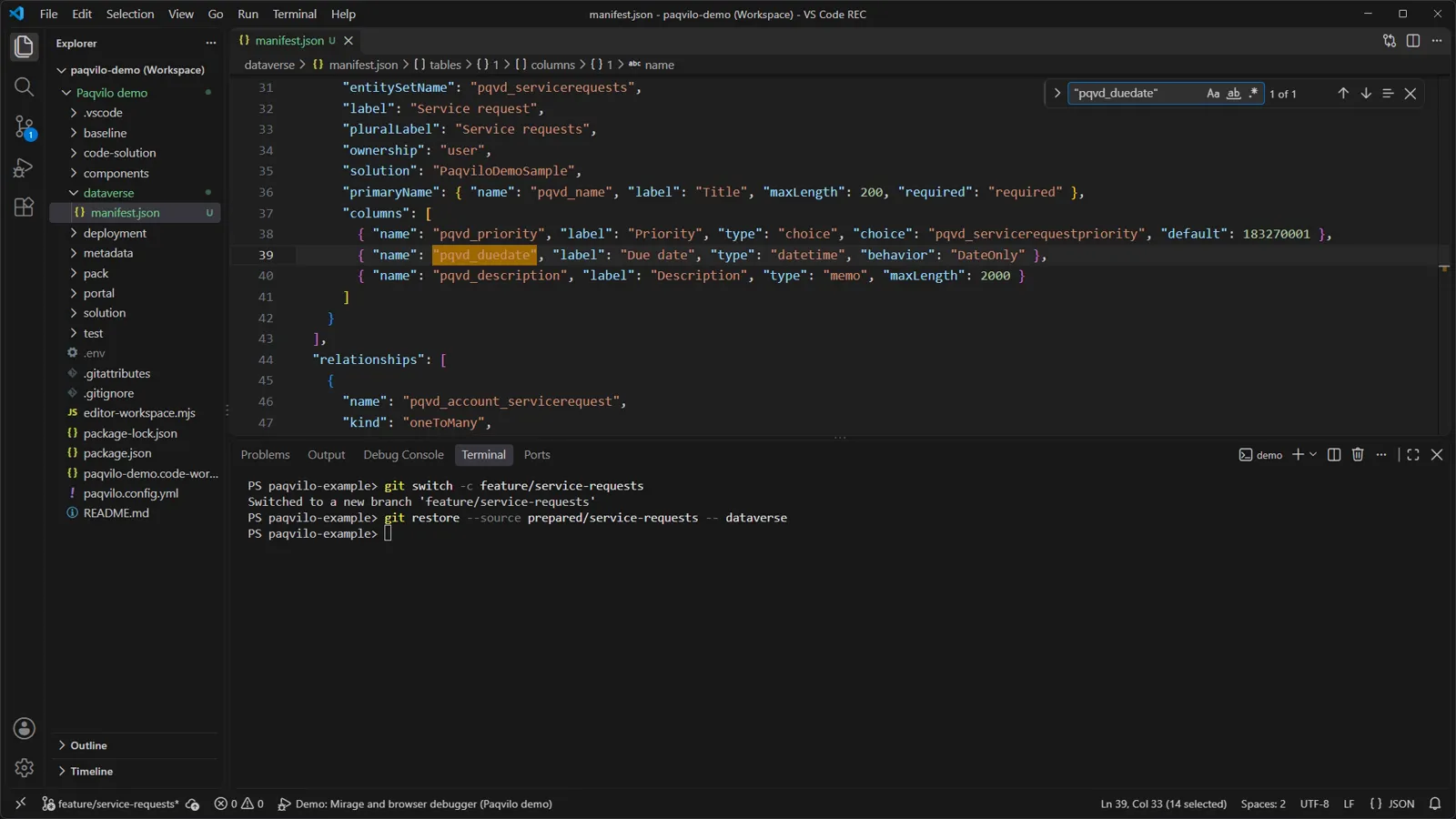
You seedataverse/manifest.json, Paqvilo's schema-as-code format. It declares the publisher pqvd, the PaqviloDemoSample Solution and a global choice with Low, Normal, High and Urgent. The new table is user-owned with primary name pqvd_name ("Title", 200 characters), plus pqvd_priority (the choice, default Normal), pqvd_duedate (datetime, behavior: DateOnly) and pqvd_description (memo, 2,000 characters). The relationship pqvd_account_servicerequest is one-to-many from account.
2. Plan offline, then add the exported Solution
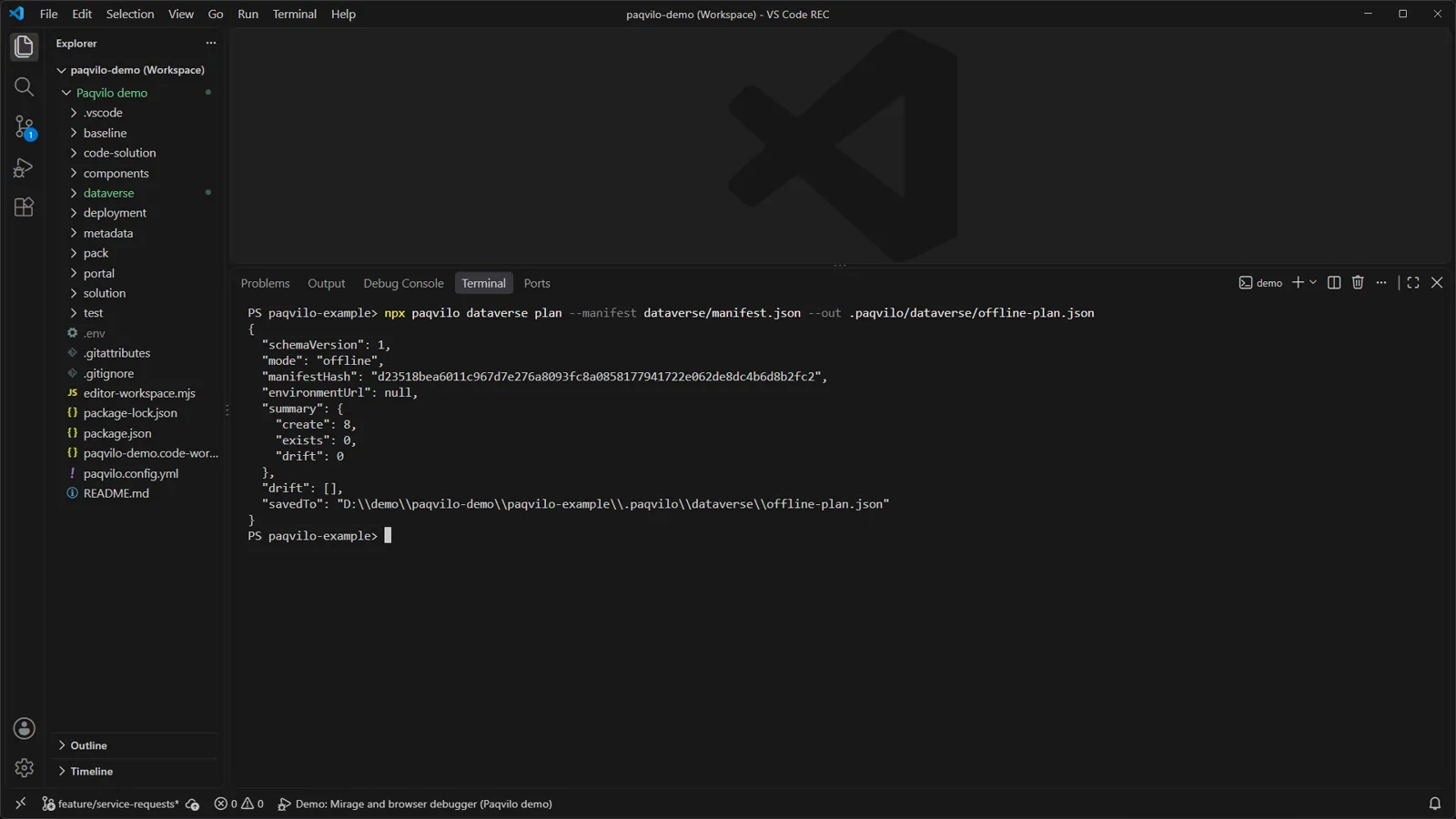
The offline plan: no environment, eight components to create.
Do
npx paqvilo dataverse plan --manifest dataverse/manifest.json --out .paqvilo/dataverse/offline-plan.json
You see"mode": "offline", "environmentUrl": null and create: 8, exists: 0, drift: 0. The saved file lists eight actions in order: publisher, Solution, choice, table, three columns and the relationship.
Why Without --connection, plan makes no network request; --out keeps the complete Web API payloads under the ignored .paqvilo/. With an authorised connection, dataverse apply verifies the organisation, preflights every component and creates them in order. It is additive (it never deletes or overwrites definitions) and journals progress so a rerun can continue. export writes an unmanaged ZIP that PAC unpacks into the folder you add next.
Now add the unpacked Solution: Solution.xml changes and new Entities/pqvd_servicerequest/, OptionSets/ and relationship entries appear. In Entity.xml, pqvd_duedate has <Format>date</Format> and <Behavior>2</Behavior> (DateOnly). The entity folder also holds the main form "Paqvilo Service Request" and the view "Active service requests", filtered to statecode = 0 and sorted by due date.
Check Mirage never reads the manifest. It renders from the Solution roots in the catalogue, which contribute table identities, columns, relationships, views, forms and choices.
3. Seed rows in the data pack
New rows in pack/fixtures.json, keyed by the table's logical name.
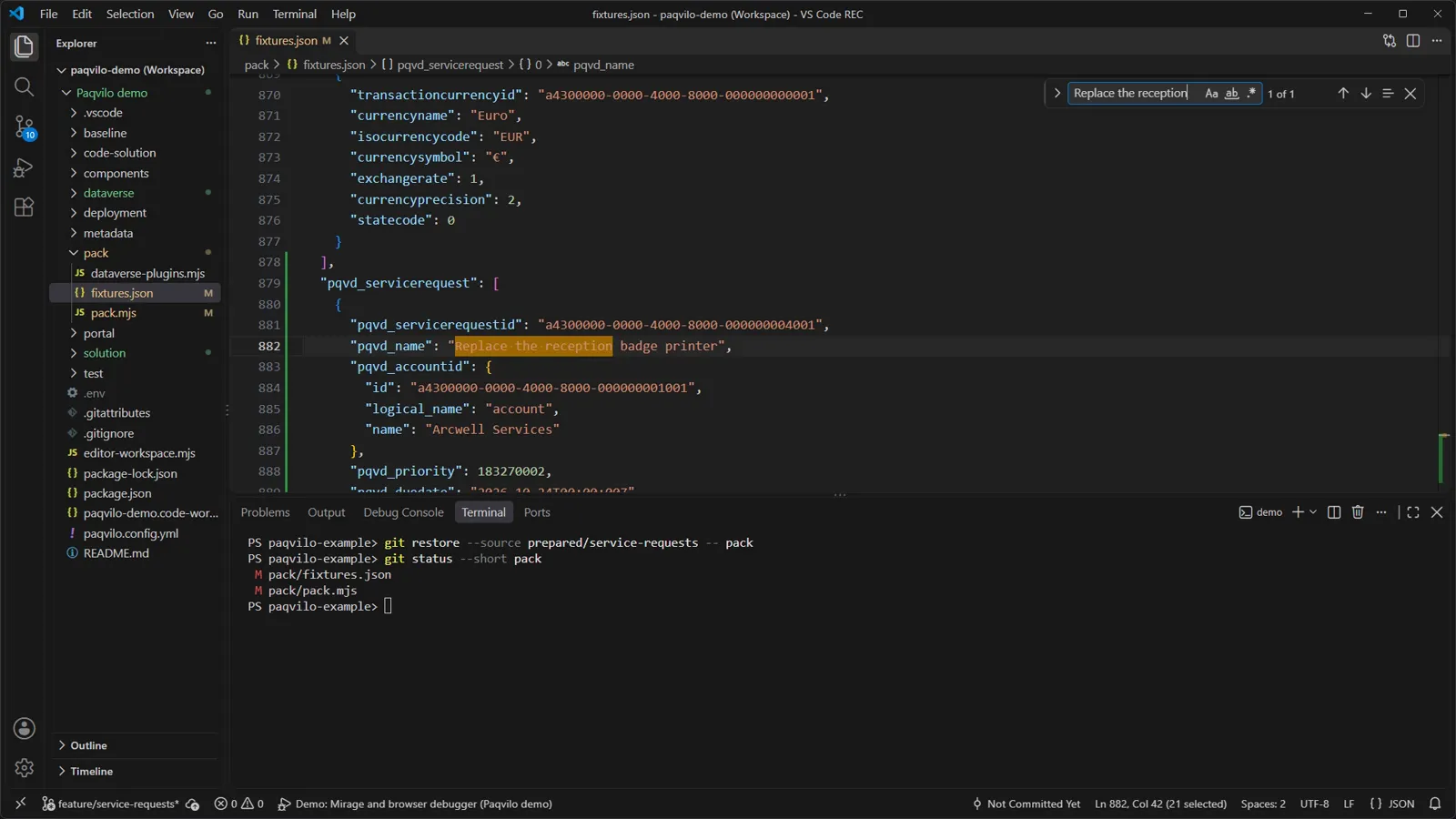
You see A pqvd_servicerequest array of eight invented rows. A lookup is stored as { id, logical_name, name }, a choice as its option value (183270002 is High), a date as an ISO string. One row is inactive (statecode: 1). pack/pack.mjs gains one mapping, pqvd_servicerequest: { entitySet: 'pqvd_servicerequests', inferred: true, idColumn: 'pqvd_servicerequestid' }, and an empty array in its empty preset.
Why Mirage keeps a pack only when its matches({ portal }) is true and offers its presets(); the catalogue's preset picks one. Its tables hold rows by logical name and mappings tie each table to its entity set and ID column.
Check Restart npm run dev after Solution or pack changes. The demo reapplies its preset at every start, so a restart also discards rows you created in the browser.
4. The page and its list
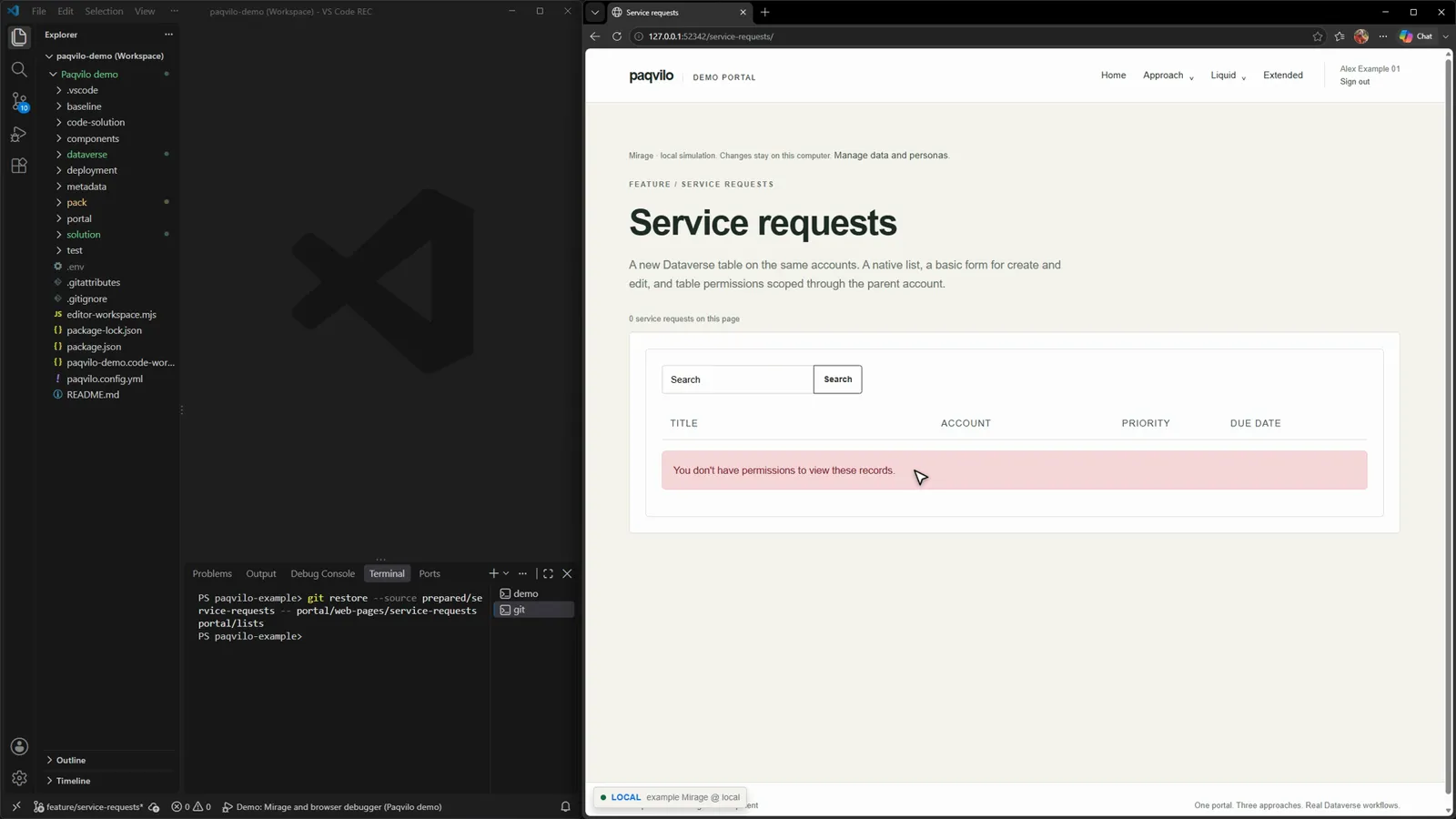
The page renders; the list has no permission yet.
Do Add the page under portal/web-pages/service-requests and the list under portal/lists, then press F5 in the browser on /service-requests/.
You see The "Service requests" heading and an empty grid with Title, Account, Priority and Due date, and "You don't have permissions to view these records."
Why The page record has Home as its parent, the partial URL service-requests and an en-US content page whose copy is one Liquid line: {% include 'entity_list' key: '…' %}. The list names the table, the view, page size 10, search, adx_entitypermissionsenabled: true and, in adx_settings, a create action labelled "New service request" plus Edit and Delete row actions. Mirage imports the new records, adds the route, renders the Liquid locally, finds the list by ID and takes its columns from the Solution view. The list enforces table permissions, and none exists yet for this table.
5. Table permissions bring the rows
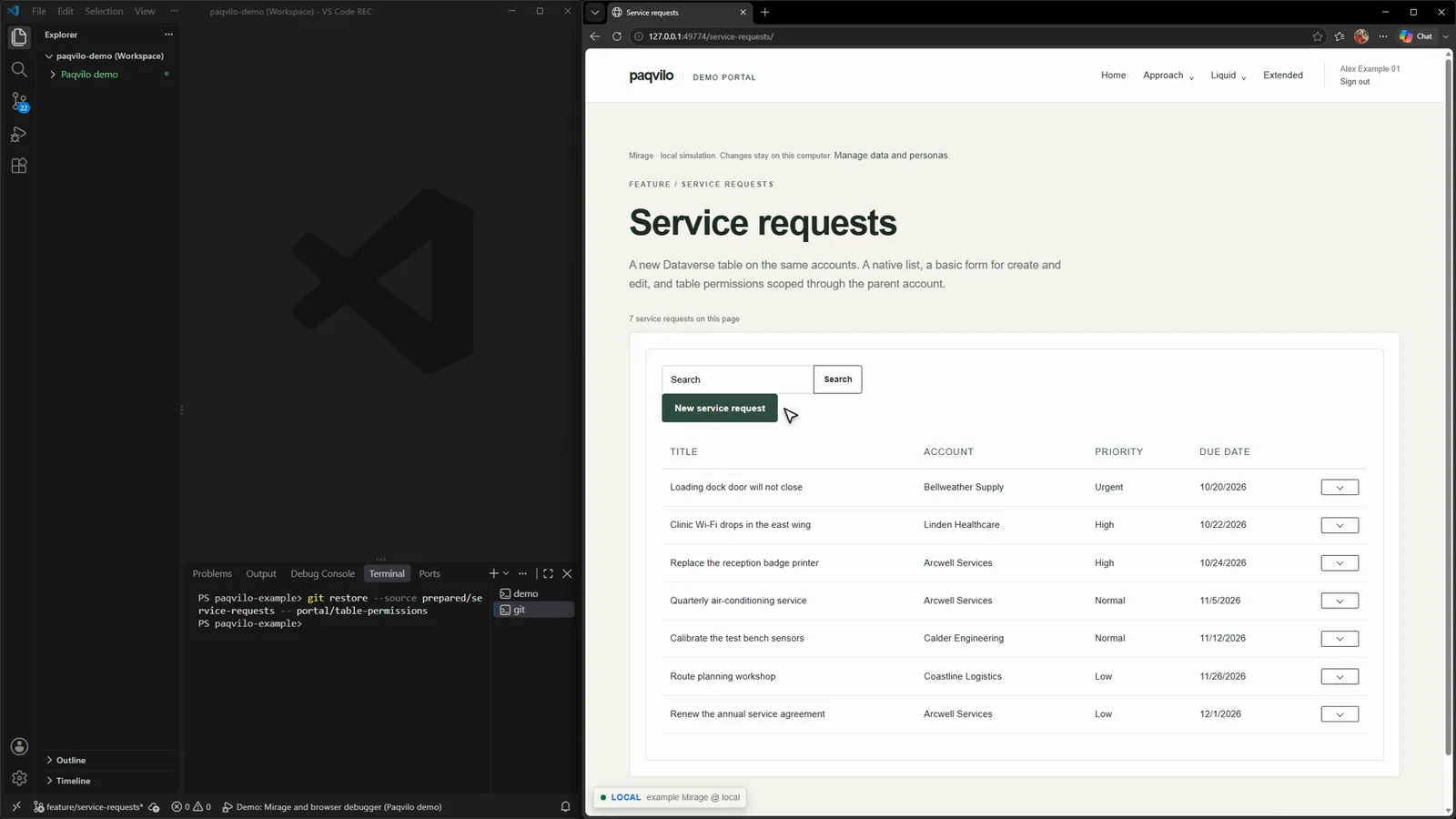
Two permission records later: seven rows and the New button.
Service request permissions
Permission
Web roles
Scope
Privileges
Service requests by account
Administrators, Workspace Editors
Parent, through "Account global" and pqvd_account_servicerequest
create, read, write, delete, append, append to
Service requests through readable accounts
Authenticated Users
Parent, through "Account workspace read"
read
One privilege, one visible effect, no restart.
Do Add the two records under portal/table-permissions and press F5. Then, in Service-requests-by-account.tablepermission.yml, change adx_create: true to false, save and press F5. Set it back afterwards.
You see Seven rows sorted by due date and New service request. With adx_create: false, the rows stay and the button is gone; with true it returns.
Why Alex Example 01 holds Authenticated Users (every signed-in contact) and Workspace Editors (from the pack). Parent scope means a service request is reachable when its account is reachable through the parent permission, here a global account grant. The eighth seeded row is inactive and filtered out by the view, not by permissions.
CheckInspect › Tables & access shows the same exported permissions, scopes and roles. An exported grant is not proof that a live user has access.
6. Basic forms, and a new request
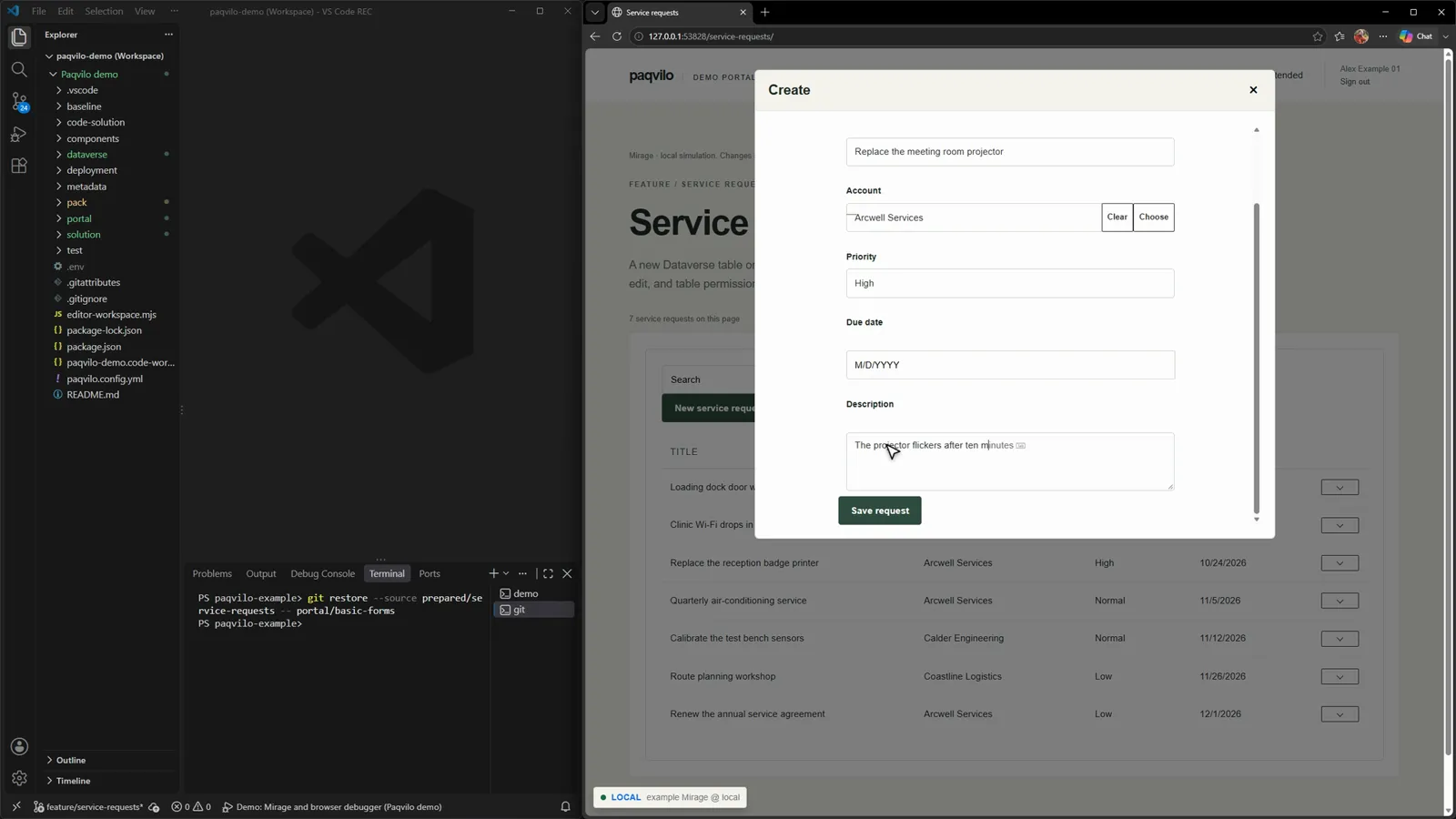
The native Create form in its modal, filled in.
Do Add the two basic forms under portal/basic-forms, press F5, click New service request, type a title, choose Arcwell Services in the Account lookup dialog, pick High, type a description and click Save request.
You see A "Create" modal with Title, Account (a lookup with Choose), Priority, Due date and Description. After the save, the new row heads the list.
WhyService Request Create (mode Insert) and Service Request Edit (mode Edit, record ID from the query string id) both render the Solution form "Paqvilo Service Request" with the submit label "Save request". Their IDs are exactly the EntityFormIds that the list's actions name. Mirage builds native forms and lists from the portal configuration plus the Solution's form and view metadata; the modal is a separate document in an iframe, and its write passes the same permission checks.
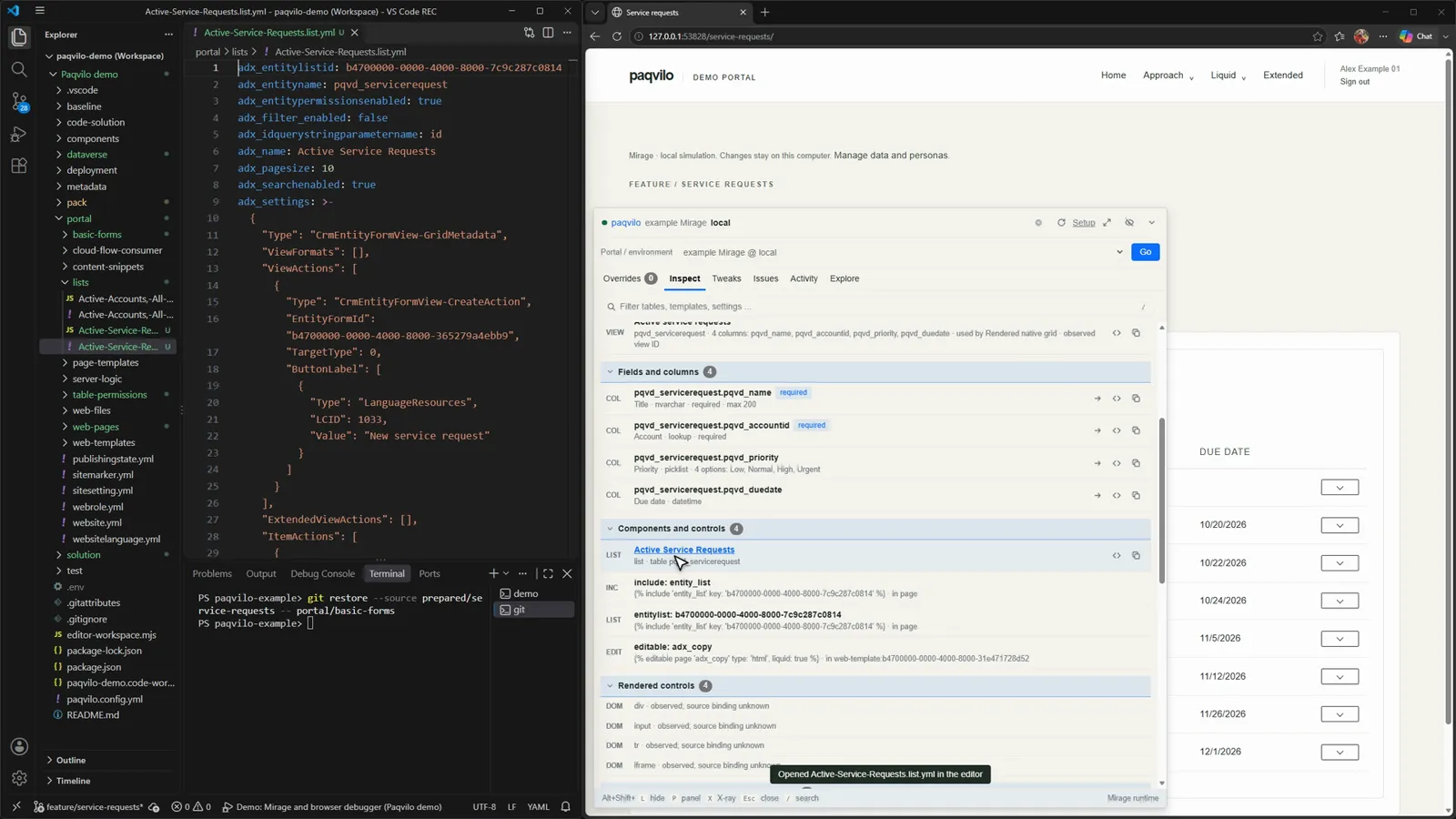
Inspect › Forms & controls; one click opens the list's YAML.
Check Press Alt+Shift+P, Inspect, Forms & controls. The section lists the view and its columns, the fields (pqvd_name required, max 200; pqvd_accountid a required lookup; pqvd_priority a picklist with four options; pqvd_duedate a datetime), the list, the entity_list include and the rendered controls. Clicking Active Service Requests opens portal/lists/Active-Service-Requests.list.yml; its CreateAction names the create form's EntityFormId.
7. Entry point, reader view and commit
The reader: same rows, no create action, no row menus.
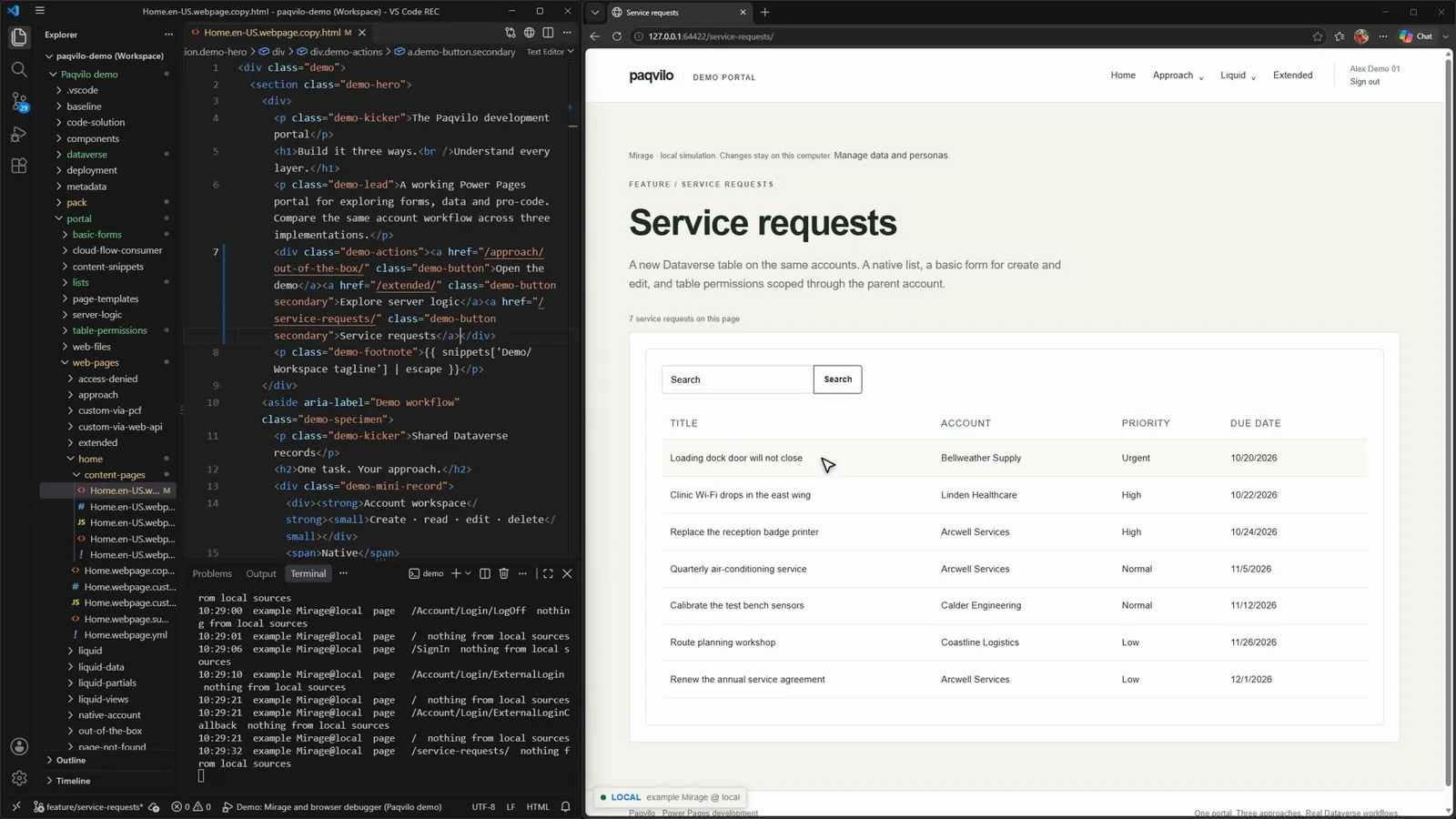
Do In portal/web-pages/home/content-pages/Home.en-US.webpage.copy.html, add one button next to Explore server logic and save:
Sign out, sign in as Alex Demo 01 and click the new button.
You see The reader sees the rows but no New service request and no row menus: only the read grant through Authenticated Users applies.
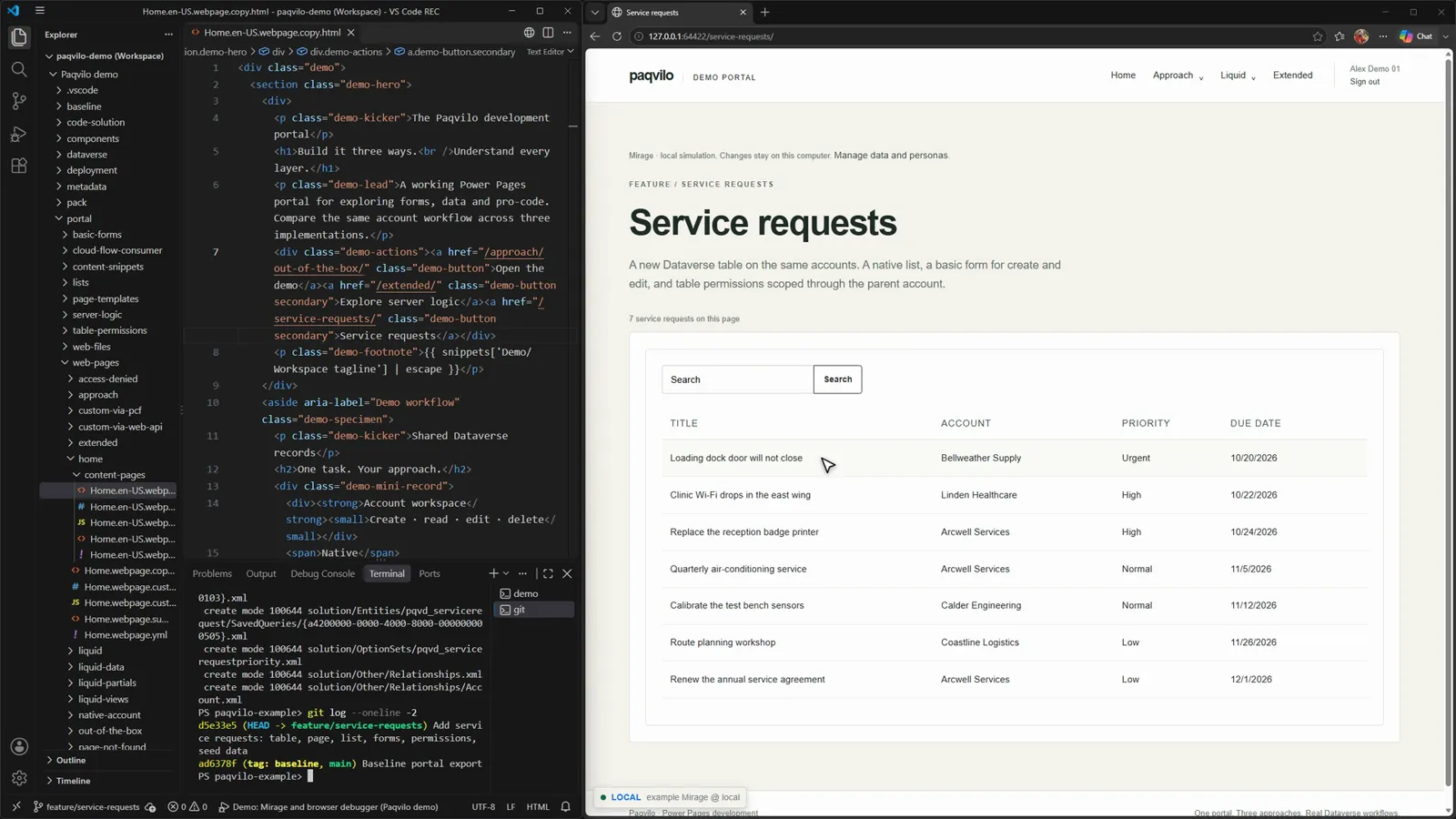
One commit holds the whole feature.
Do
git add -A
git commit -m "Add service requests: table, page, list, forms, permissions, seed data"
git log --oneline -2
Check Nothing was deployed. The table exists in your files, not in Dataverse. Create it with dataverse apply against an authorised environment or in the maker tools, and deploy the portal changes through PAC CLI and your pipeline.
07 / YOUR OWN PORTAL
Scaffold, connect, run and configure.
The demo arrives wired up; your portal does not. Here you scaffold an empty project, connect a PAC export and its unpacked Solutions, check what Mirage reads, run it and change the configuration through forms. Three commands start three different things:
Starting commands
Command
What you get
paqvilo init
An empty consumer project: catalogue, npm scripts, a project data pack, tests and VS Code files.
paqvilo mirage demo
The populated sample from chapters 1–6.
paqvilo mirage init
A local runtime project for an existing catalogue, written under .paqvilo/.
Scaffold the project
Do
npx paqvilo@^0.9.5 init ./my-portal-project --name my-portal-project --site portal
cd my-portal-project
npm run setup
You seeinit prints the project folder, how many files it created and the next steps. Generation installs nothing, opens no browser and makes no network request; it creates no sources, runtime state, .env, lockfile or node_modules. npm run setup then installs dependencies, checks the chosen browser and refreshes the editor paths.
Scaffolded files
Path
What it is
paqvilo.config.yml
The shared catalogue, with inert placeholder URLs and marked source paths.
Agent instructions, a personal-setting template, ignore and line-ending rules.
Already have a project? Run npm install --save-dev paqvilo@^0.9.5 and npx paqvilo doctor --setup --json; init --into-existing adds missing files only.
List what is unfinished
Every TODO(paqvilo-init) marker, with file and line.
Do
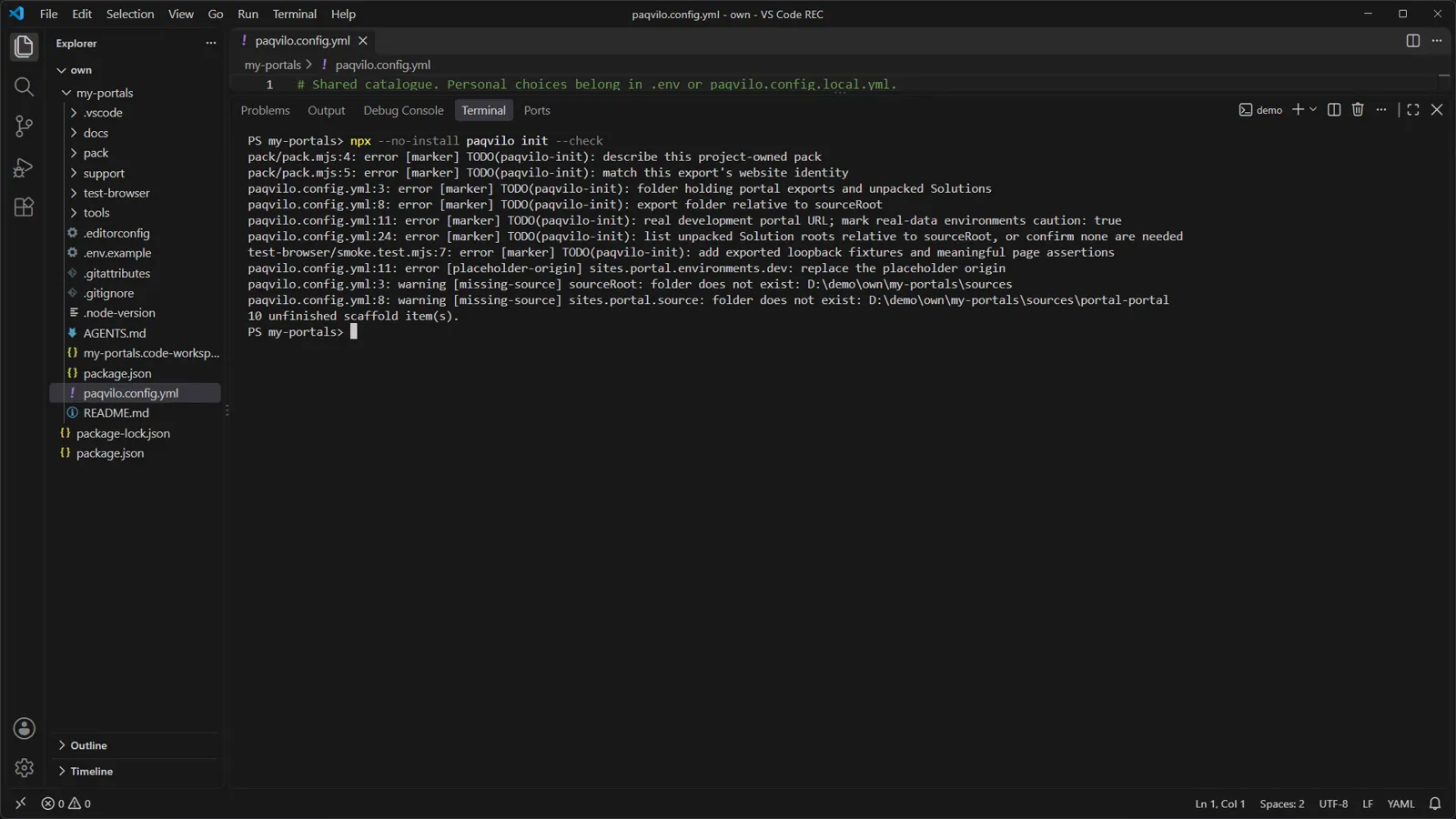
npx paqvilo init --check
You see One line per marker: the pack's description and matches, sourceRoot, the export folder, the placeholder development URL, the Solution roots and the smoke test's fixtures. A placeholder-origin error names the .example.test origin, missing-source warnings name folders that do not exist yet, and the last line counts the unfinished items.
Why The check reads files without importing pack JavaScript, and a personal override cannot hide a shared placeholder URL. Any unfinished item exits with code 1, so it also works in CI.
Check A clean check means the scaffold is complete, not that your portal renders. That is what the next steps check.
The catalogue, annotated
Keep one shared paqvilo.config.yml in your portal project. It connects source exports, live environments and local runtimes. Unknown settings are rejected; restart running previews after a change. Open the entries below for what each key does, or fill in the builder to get a starting file.
paqvilo.config.ymlshared catalogue
Pass --config <file> when running outside your project. Otherwise Paqvilo uses the working directory's catalogue, falling back to the bundled example, whose live URL is an inert placeholder.
Your editor CLI's name or actual executable path, used when Inspect opens a source. VS Code uses code or its installed code.cmd. PAQVILO_EDITOR also works; restart the session after changing it.
Resolved from the catalogue directory. --repo or PAQVILO_REPO overrides it and resolves from the invoking working directory, which is how you point at another checkout or worktree.
portals: all makes configured targets available in one browser. Origins activate on visit; --site selects the first portal. Use --portals selected to limit lifecycle operations. portals: all excludes caution targets unless explicitly selected or includeCaution: true is set.
Resolved from the source root. The directory must contain the exported site, such as website.yml and web-pages/ for a standard export. Absolute paths work for separate Git checkouts.
Named online environments for Lense: an origin, or { url, caution: true } for real-data environments. Leaving a local runtime for a live target or opening a caution target requires an in-panel confirmation.
markup controls literal markup patches (enabled, the kinds, and the Git baseline, default HEAD). scope: changed limits overlays to files that differ from that baseline.
Unpacked Solution folders, resolved from the source root and layered in dependency order; solutionOrder: explicit keeps your order. Live Lense Inspect can read them without starting Mirage or loading pack code.
Explicit project modules and seed data. Modules resolve from the catalogue directory; register only modules you trust. presetMode: bootstrap keeps an existing state; always reapplies the preset at startup.
presetConfiguration, render.timeLimitMs, deploymentProfiles, personaContexts, identityProvider, platform, compat and head. Each links to its reference from the options table.
Records behavior unavailable from exports, such as sign-in path, Web API conventions or SDK message names. Every observation needs an evidence reference from the site being modeled; do not copy another site's observations.
channel: msedge (default), chrome or chromium. Browser profiles keep identities separate. --debug-port configures a toolkit-launched browser. When attaching with --cdp-url, clear any inherited browser.debugPort with null, PAQVILO_DEBUG_PORT=0 or dev --debug-port 0.
Settings resolve highest priority first: CLI options, shell PAQVILO_* variables, .env beside the catalogue, paqvilo.config.local.yml beside it, then the shared catalogue. Ignore personal configuration, .env and .paqvilo/. Linked worktrees do not automatically inherit another checkout's .env. paqvilo lense list --settings shows settings and their origins.
PAQVILO_REPO, PAQVILO_SITE, PAQVILO_ENV, PAQVILO_BROWSER, PAQVILO_PROFILE, PAQVILO_SCOPE and PAQVILO_BASELINE are common environment choices. .env.example in a scaffold lists them, including per-site ones.
Mirage serves it on each runtime and links to it from /_sim/; Lense prints a separate loopback URL. It is never mounted on a live portal origin. Saves apply on the next preview start.
Runtime discovery, logs and generated projects live under .paqvilo/ beside the catalogue. Discovery files contain bearer tokens: never share or commit them. Use the same scope for mirage status and mirage stop.
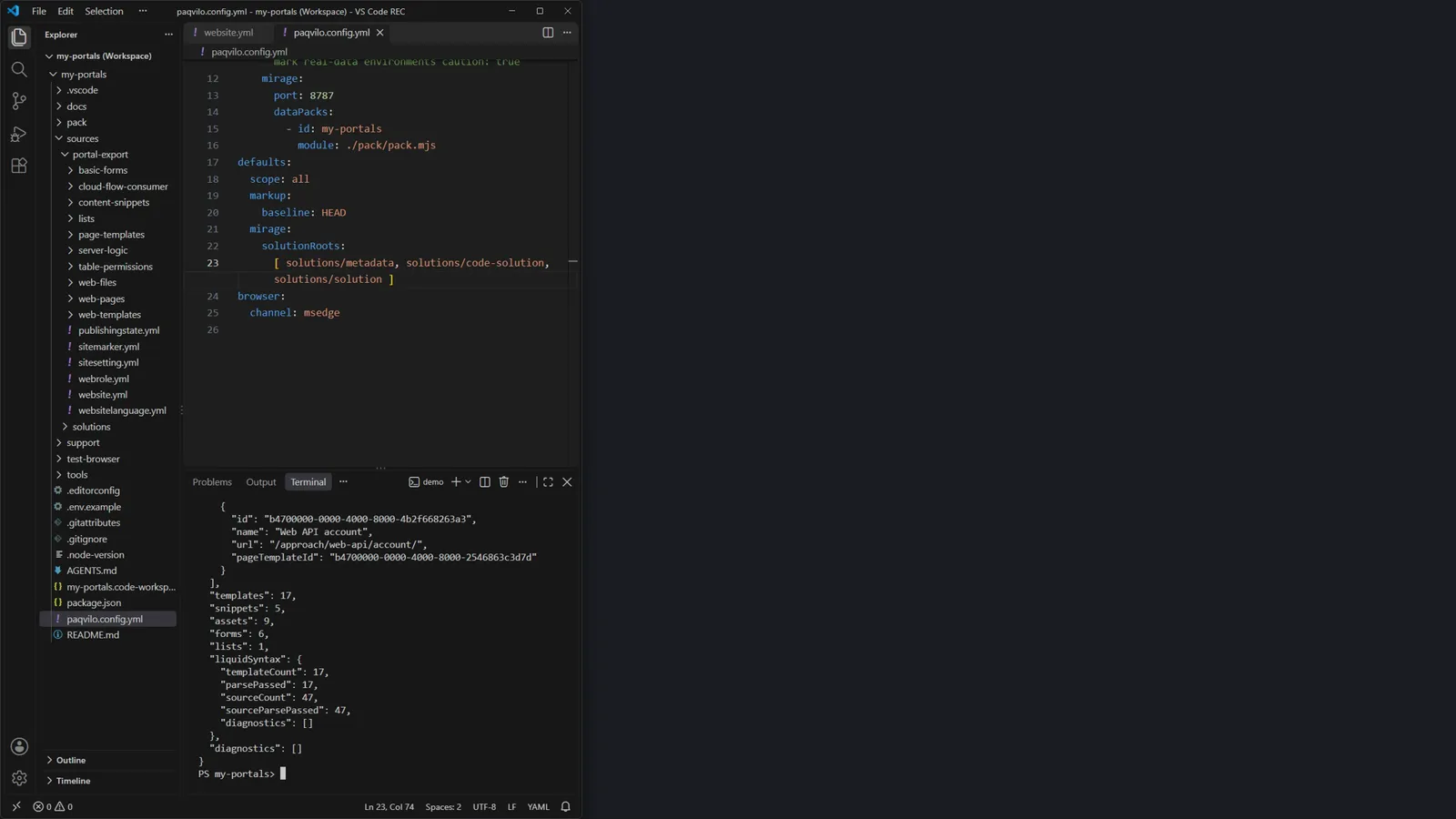
Two edits in the catalogue, then mirage inspect: counts and no diagnostics.
Do Put your PAC export under sources/ (its root holds website.yml and folders such as web-pages/ and web-templates/) and your unpacked Solutions under sources/solutions/. If you do not have an export yet, follow Microsoft's download website content guide. In the catalogue, set source to the export folder and list the Solution roots, then run:
You see JSON: each page with ID, name, URL and page template, then counts of templates, snippets, assets, forms and lists, a Liquid syntax pass and diagnostics. The recording used a copy of the demo's export as "yours": 17 templates, 5 snippets, 9 assets, 6 forms, 1 list, every template parsing, and diagnostics: [].
Whyinspect works offline. The importer accepts standard portal exports, enhanced unpacked component XML and code-site exports, and uses record types and IDs, page and template relationships, languages, settings, snippets, forms, lists, permissions and web-file metadata. Solution roots add table identities, columns, relationships, views, system forms, choices and environment variables. Ambiguous inputs produce diagnostics. Mirage fetches nothing from Dataverse.
Check Your expected pages appear under pages. Missing pages or diagnostics mean the paths need fixing before anything else.
Run it
The export, rendered locally on the catalogue's port.
Do
npx --no-install paqvilo mirage dev --config ./paqvilo.config.yml --site portal
You see The terminal summarises the session: the browser and its toolkit profile, the debugger port, the site and its local URL (http://127.0.0.1:8787), the source folder, "Mirage renders local sources and owns page reloads", the source-map count, the agent API discovery file and the panel shortcuts. Edge opens your home page.
Why Business tables start empty: a new state holds portal configuration only. The scaffold's pack has matches: () => false, so it contributes nothing until you match your site, as the demo's pack does with portal?.website?.name === 'Paqvilo demo'. The banner at the bottom of the recorded page is fixed text in the copied export's script, not a row count. dev reads the catalogue directly; mirage init --config … --site … instead writes a runtime project file under .paqvilo/, reports whether any registered pack matches this portal and prints the next command.
Check Open /_sim/: Portal Studio counts the configured entities and discovered pages. For quick sample rows without a pack, stop the session and generate a separate state:
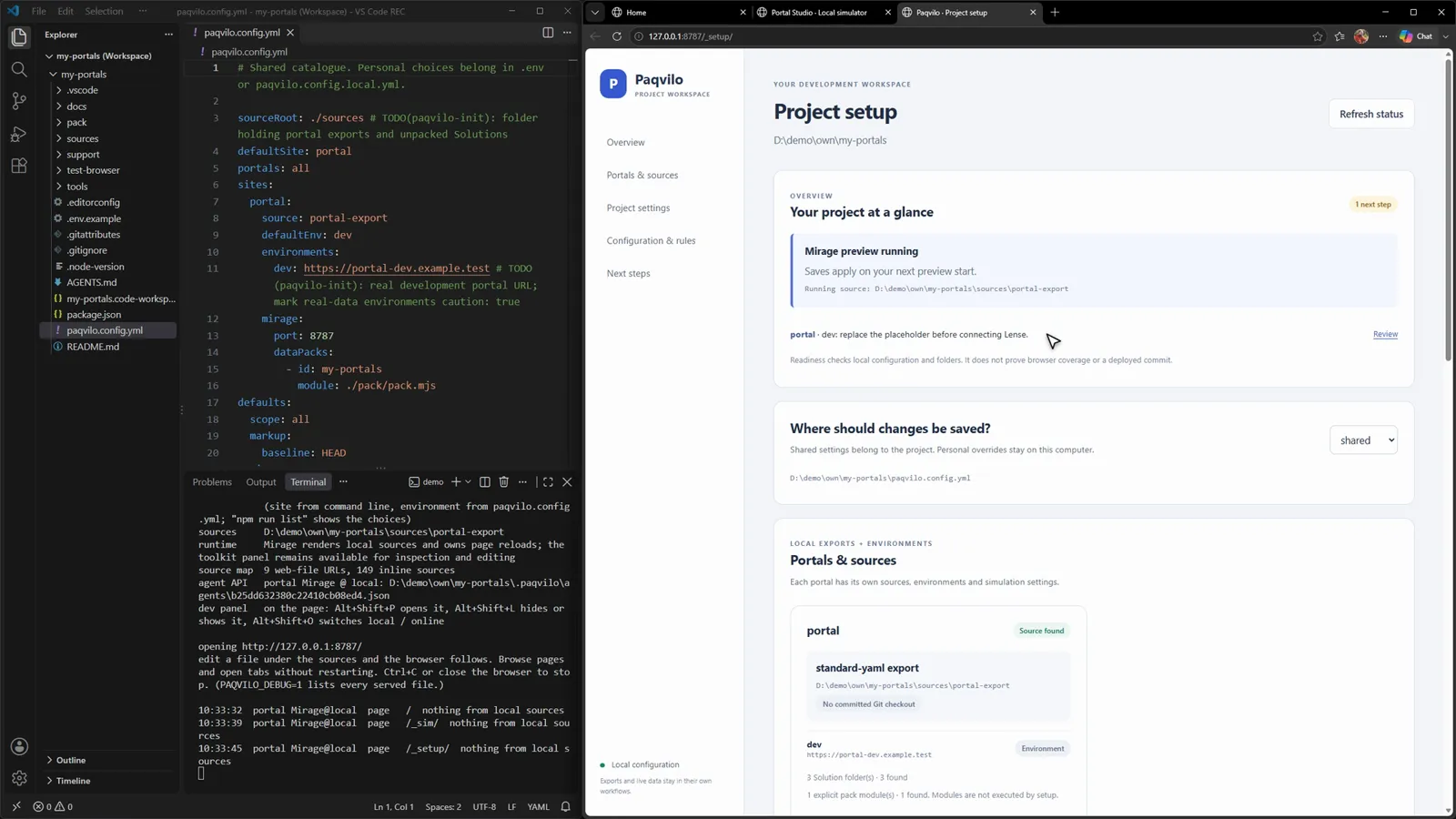
Do With mirage dev running, open /_sim/ and click Project setup, or use the panel's Setup link. Without a running preview, run npm run configure (paqvilo setup --open).
You see "Mirage preview running · Saves apply on your next preview start", the next steps (here: replace the placeholder dev origin before connecting Lense) and a card per portal with its export type, Git state, environments, Solution folders and pack modules ("Modules are not executed by setup").
Edit portal settings: Mirage port 8787 becomes 8791, then Save portal.
Do Open Edit portal settings, change Mirage port to 8791 and click Save portal.
You see "Saved. Restart the preview to apply configuration changes." VS Code reloads paqvilo.config.yml with port: 8791, and the overview says the running sources, browser destination and state stay as started.
Why The workspace serves loopback connections only, validates Host, Origin and a CSRF token and is confined to the selected configuration layers. Where should changes be saved? picks the shared catalogue or your personal paqvilo.config.local.yml; the personal layer refuses to save if that file is tracked by Git. A save is checked against the revision you loaded, validated against the schema, written to a temporary file and renamed into place. It never deploys, runs PAC, reads live references or imports packs.
Check Review the catalogue diff before you commit it, and restart the preview to apply the change. Readiness checks configuration and folders; it does not prove browser coverage or a deployed commit.
08 / LENSE ON A DEPLOYED PORTAL
Your files over the real backend, one key from what is deployed.
Mirage runs a portal on your machine. Sooner or later you need to see a change against the real backend: real sign-in, real records, real Liquid. Lense opens a dedicated browser on the deployed site, answers requests for your mapped sources from your working tree and lets you flip back to what is deployed with one shortcut.
How it works Lense is a browser overlay, not a server. It drives a dedicated Edge through the Chrome DevTools Protocol and pauses every request to the portal's origin, then answers each one itself:
A web file that maps to a local file (JavaScript, CSS, an image) is answered from disk; the portal is not asked.
A page is fetched from the deployed portal in the same browser context, so with your signed-in session. The portal runs Liquid and Dataverse as usual; Lense then lays your local inline blocks and supported literal markup changes over the HTML.
Everything else, such as Web API calls, goes to the portal untouched. Other origins are not intercepted.
The mappings come from the export, not from rules you write: Lense knows that /demo.css is web-files/demo.css, which custom JavaScript belongs to which page, and which record and field a source belongs to. Three consequences follow. Liquid and Dataverse still run on the online portal. Nothing is deployed: saving changes a local file, and the overlay exists only in this browser. And the backend is live: form submissions in the Lense browser change live data.
Add your portal as an environment
Do Replace the placeholder dev origin with your development portal and mark anything with real data as a caution target:
If the URL is personal, put the same structure in paqvilo.config.local.yml beside the catalogue; it is read after the shared file and stays in .gitignore. Then check the mapping offline:
npx --no-install paqvilo lense doctor --config ./paqvilo.config.yml --site portal --env dev
Why Origins must be HTTP(S) without credentials, paths or query strings. caution: true makes the panel ask before it opens that target. doctor checks configuration, source mapping, Solution inputs and the baseline without a browser or portal request.
Commit a baseline
Do If the export has no Git history yet, commit it before you edit it:
Why Lense compares your working tree with a Git commit that stands for "what is deployed". Literal markup patches and the changed scope both need it. The baseline records local files; it does not tell you which commit is deployed, and Lense never infers one.
Start Lense and sign in
Signed in through the site's own sign-in, then Alt+Shift+P opens the Lense panel.
Do Start the session (in the demo, npm run lense runs the same command for the site example):
npx --no-install paqvilo lense dev --config ./paqvilo.config.yml --site portal --env dev
Sign in through the portal's own Sign in link with the account you intend to use; on Windows, single sign-on may finish on its own, and credential or MFA prompts stay with you. Then press Alt+Shift+P.
You see Before the browser opens, the terminal summarises the source folder, the scope and pinned baseline, the branch, how many URLs map to local files and how many custom JavaScript and CSS blocks belong to pages, forms and lists. After that, one line per page view, such as page / 7 local files. The panel shows, from top to bottom:
Header: the site and environment and the Local / Online switch.
Portal / environment with Go. A target switch commits only with Go or Enter; leaving a local runtime for a live target, or opening a caution target, asks first.
Git line: main @ <commit> on the left is where your checkout is now; baseline <commit> on the right is the commit Lense pinned when the target activated.
Tabs: Overrides, Inspect, Issues, Activity and Explore. Overrides lists this page's sources with filters All, Edited and ≠ local, the scope switch (all / changed) and one row per mapped file, such as /demo-jquery.js ← web-files/demo-jquery.js marked = local.
Footer: Alt+Shift+L hides the panel, P opens it, O switches Online/Local, X starts X-ray.
Why Lense does not sign you in: it uses the portal's own flow, so you test the real sign-in. The dedicated browser keeps its own profile, separate from your everyday browser.
Check The panel names the site and environment you meant. Use environments you are authorised to work in: what you submit, edit or delete in this browser happens on the live portal.
Edit CSS from the panel
The Overrides row opens demo.css; on save, the page restyles in place.
Do Type demo.css into Filter overrides and click the row. In VS Code, change --demo-forest from #314c40 to #4b3aa8 and save.
You see The hero card, the primary button and the links change colour without a reload. The terminal logs changed web-files/demo.css -> styles swapped and a toast reads Styles swapped · demo.css.
Why Lense watches your source folder. A saved stylesheet is swapped in the open tabs; other saved files reload the tabs that show an affected page. The stylesheet comes from your disk with cache-control: no-store, so the next request reads the file again.
Check The deployed site itself has not changed; only this browser shows your file.
Compare Online and Local
Alt+Shift+O: deployed green, then your violet again.
Do Press Alt+Shift+O, look, and press it again.
You see The status chip reads ONLINE and the page shows the deployed colour; the terminal logs page / nothing from local sources. The second press brings back LOCAL, the violet and 7 local files.
Why Online is not a second session. It turns the overrides off in the same browser, so the portal answers every request itself; the Activity log calls it "Overrides off: the site as <environment> serves it". You compare the same page, as the same signed-in user, one key apart.
Find the source of an element
Do Press Alt+Shift+X on the deployed page and use X-ray exactly as in chapter 3; Open source opens the candidate in VS Code at its matching line.
Why Inspect and X-ray are available for live and Mirage sessions alike. Overrides answer "what did Lense replace?"; X-ray answers "which file made this element?". Matching candidates do not establish which deployed revision rendered the element.
Save a script, and the page reloads with it
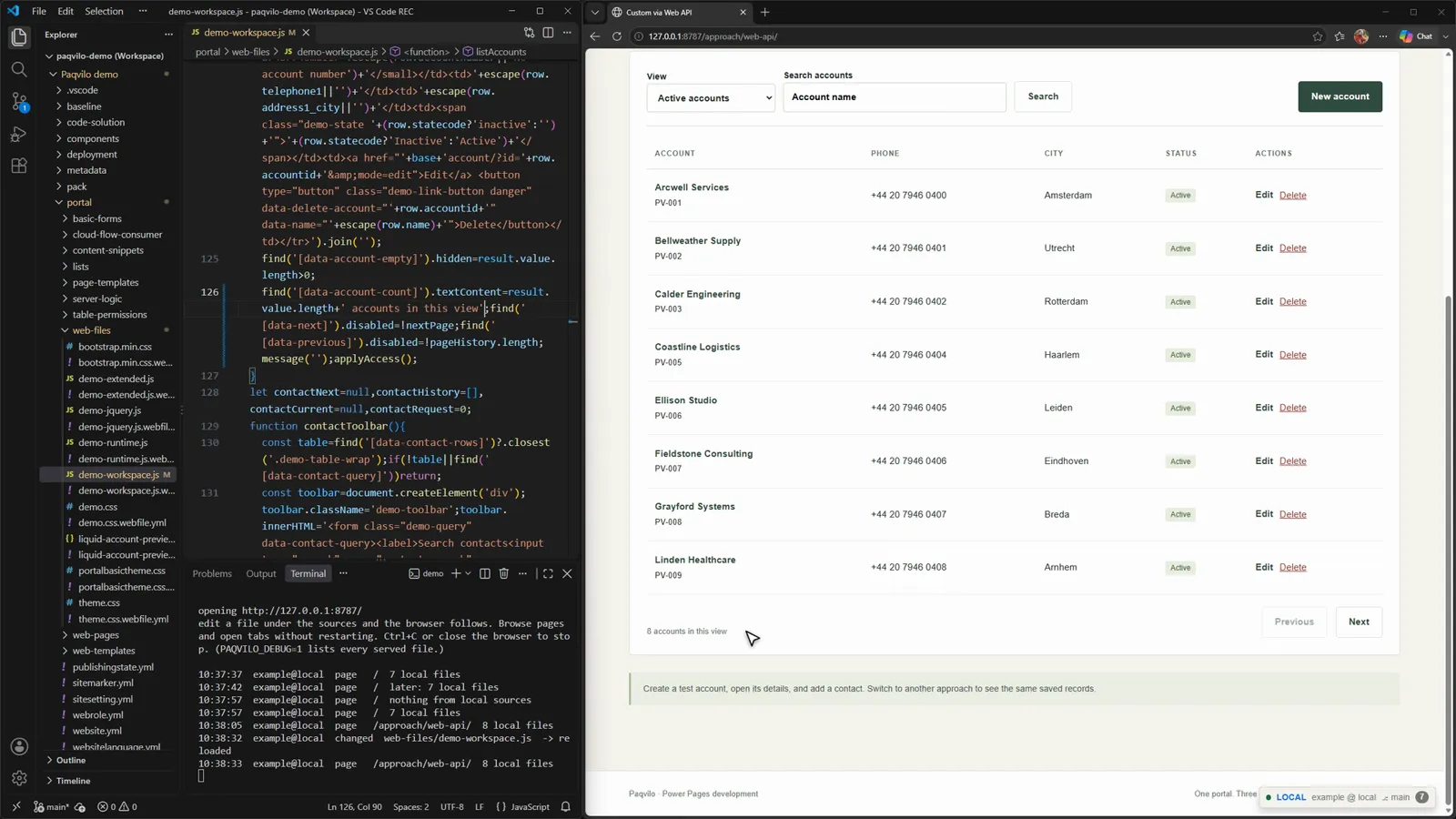
Same deployed page, same records, your script: "8 accounts in this view".
Do Open the Web API page. In portal/web-files/demo-workspace.js, change ' accounts on this page' to ' accounts in this view' and save.
You see The terminal logs changed web-files/demo-workspace.js -> reloaded, then page /approach/web-api/ 8 local files. The list below the accounts reads "8 accounts in this view".
Why A running page cannot safely swap a script, so Lense reloads instead. Shared sources refresh all of the portal's tabs; a page's own sources refresh only that page. The page HTML and the account rows still come from the portal; only /demo-workspace.js comes from your disk, with a source map that points at your local file (chapter 9 uses it).
Check Halfway through a form? Pause live reload in the panel: saves accumulate and your unsaved input survives. --no-reload or PAQVILO_LIVE_RELOAD=false turns reloads off for the session.
Switch branches under a running Lense
git switch in a second terminal; the page follows the branch.
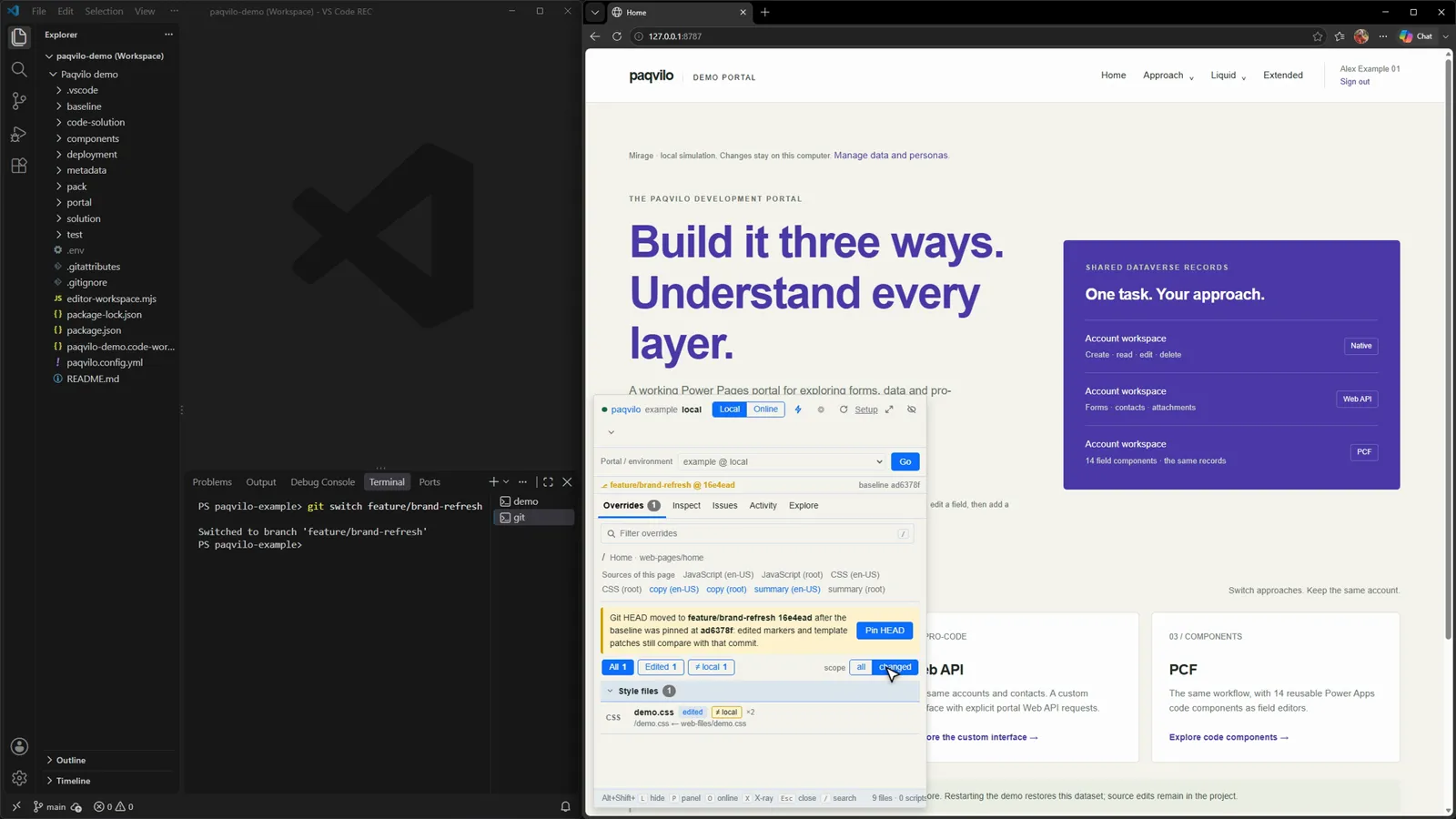
Do Commit a demo.css change on a branch (the recording uses feature/brand-refresh, which only changes portal/web-files/demo.css). Keep Lense running on main and, in a second terminal, run git switch feature/brand-refresh. Then open the panel and click changed next to scope.
You see The page turns violet without a restart and the status chip names the branch. The Git line reads feature/brand-refresh @ <commit> while the right side still shows the old baseline, with a banner: "Git HEAD moved to feature/brand-refresh … after the baseline was pinned …: edited markers and template patches still compare with that commit", and a Pin HEAD button. With scope changed, Overrides drops to the one file that differs: demo.css, edited and ≠ local.
Scope changed: only the file that differs from the baseline is overlaid.
Why The baseline defaults to HEAD, pinned when a target activates; committing or switching later does not move it. Pin HEAD pins a fresh baseline at the current HEAD, as a restart would (an explicit ref stays explicit). Lense watches the checkout's Git directories, so it notices when HEAD or a ref moves; its changed set is git diff --name-only <baseline> plus untracked files. Scope all (the default) overlays every mapped local source; changed overlays only files that differ from the baseline, so an unrelated file in your checkout cannot hide what is deployed.
Check Click all to return to every mapped source. If you know which ref is deployed, set it explicitly with --baseline (a branch or merge-base:<branch>).
Patch the deployed page copy
A personal file turns patching on; saving the page copy reloads the page with the new heading.
Do The demo catalogue turns markup patching off. Turn it on for your checkout only, in paqvilo.config.local.yml beside the catalogue, before you start Lense:
sites:
  example:
    markup: { enabled: true }
Press Ctrl+P, open Home.en-US.webpage.copy.html, change Build it three ways. to Build it your way. and save. Then press Alt+Shift+O twice.
You see The terminal logs … Home.en-US.webpage.copy.html -> reloaded, then page / 7 local files, 1 patch, and the heading reads "Build it your way. Understand every layer." Online shows the deployed "Build it three ways." again.
Why Page copy is not a web file: the portal renders it, Liquid and all, so Lense cannot serve it from disk. Instead it diffs your file against the baseline version and turns each changed block into a hunk with an anchor: the old lines plus literal context, grown one line at a time until the anchor occurs exactly once in the baseline file. Lines with Liquid tags cannot serve as context; a {{ … }} output inside a context line matches whatever the portal rendered there. On every reload, Lense searches the deployed HTML for the anchor, keeps only matches on word boundaries and replaces the old text with yours. Here the changed line was plain HTML, unique in the baseline and present once in the response, so it counted 1 patch.
When Lense refuses a patch (reported in the panel's Issues tab)
What you changed
Why it is not applied
A Liquid tag, a comment or capture body, or multi-line or whitespace-controlled output
The portal has to render it.
Text between Liquid tags with no literal text next to it
Nothing locates the change in the page.
A new file that does not exist at the baseline
It does not exist online yet.
A new {{ … }} expression
Only the portal can evaluate it.
Text whose anchor also appears in another language's copy
The portal language cannot be determined safely.
Text that occurs several times and cannot be made unique
"occurs N times in the page, change not applied".
Check One case is silent: if the deployed page no longer contains the baseline text (someone deployed a different heading after your baseline commit), Lense finds no anchor and shows the deployed text. Compare with Online, check Issues and set --baseline to the ref that matches what is deployed.
Settings and the commands that check a change
Lense settings
Area
Catalogue
CLI / environment
Environments
environments.<name>: a URL or { url, caution, baseline, scope, startPath }; defaultEnv
--env, PAQVILO_ENV; --url, PAQVILO_URL
Sources
sourceRoot, site source
--repo, PAQVILO_REPO (preview a review branch in a second worktree)
--baseline, PAQVILO_BASELINE: HEAD, a branch, or merge-base:<branch>
Scope
site or environment scope
--scope, PAQVILO_SCOPE: all or changed
Browser
browser.channel, browser.profile
--browser, PAQVILO_BROWSER; --profile; --cdp-url
Debug port
browser.debugPort
--debug-port, PAQVILO_DEBUG_PORT; 0 turns it off
Editor
editor
PAQVILO_EDITOR; called as <command> -g file:line
A save is not validation. After a refresh, check applied rows in Overrides and unmatched patches, deployment requirements, errors and failed requests in Issues. Then run:
audit --all --strict inventories the exports and exposes blocked or unaccounted code; it measures source classification, not what a browser applied. verify copies the sources to a temporary Git repository, opens the online site through the overlay, edits the copies and checks each edit on the page. --signed-in reuses the dev session's identity, so close lense dev first; --headed lets you sign in and --sign-in-timeout bounds the wait in milliseconds. A sign-in page is not coverage.
What Lense does not do, and what to use instead
You want to
With Lense
Do this instead
See a Liquid change
The portal renders the deployed template
Use Mirage, or deploy through your pipeline
Change a site setting or Dataverse behaviour
Evaluated online
Deploy with PAC CLI or your pipeline
Try a form safely
Submissions hit the live backend
Use Mirage's local data or a non-production environment
Know which commit is deployed
The baseline is a local Git commit
Check your release records
Multipart form posts (file uploads) pass through untouched; Lense does not rewrite their responses.
09 / DEBUG WITH BREAKPOINTS
A breakpoint in the export file, hit from the portal.
On a deployed portal, a web file reaches the browser under a URL that has nothing to do with your export, and a breakpoint set in VS Code never binds. Paqvilo serves scripts with source maps that point at your export files, so the breakpoint lands in the file you edit.
Set a breakpoint and hit it
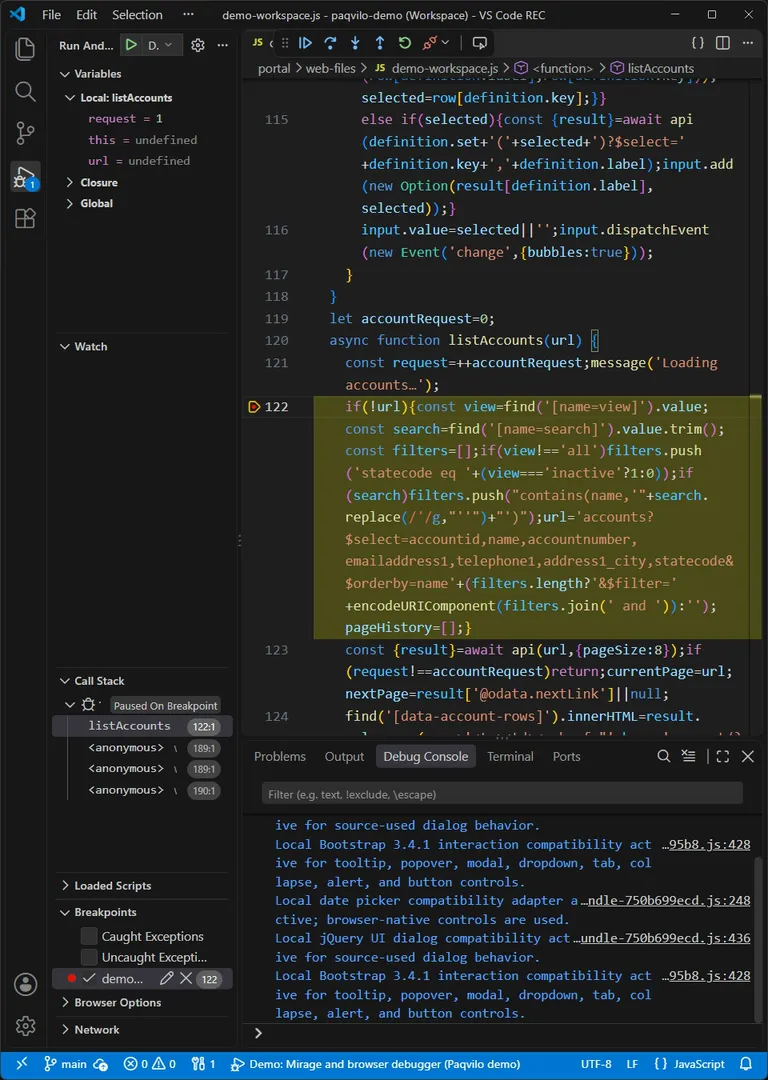
Paused on line 122: request = 1, url = undefined.
Do In the demo workspace, press Ctrl+P, open demo-workspace.js, go to line 122 and press F9. Press F5 (Demo: Mirage and browser debugger). When Home has loaded, click Open the demo. Press F5 again to continue.
You see A red dot and demo-workspace.js 122 under Breakpoints. The dot stays hollow on Home, which does not load that script. On the Web API page, VS Code pauses before the list exists, with Edge still saying "Loading accounts…". Variables show Local: listAccounts with request = 1 and url = undefined; the call stack reads listAccounts 122:1. Continue, and the list renders.
Why Line 122 sits inside listAccounts(url). On the first load url is undefined, so it reads the View and Search fields and builds the Web API query: $select, $orderby=name and an optional $filter.
Check The configuration attaches to Edge, not to Mirage: it is an attach to port 9222, with webRoot set to portal, / mapped to portal/web-files, a 60-second timeout, preLaunchTask set to the debugger task and skipFiles for the platform's xrm-adx scripts and minified files. The siblings attach to Lense's browser for an environment you name when prompted, or to an already running browser.
Limits The debugger shows the JavaScript that Liquid rendered; it does not step through Liquid. Plugins, server logic and flows do not run in the browser: test them through their results (chapter 5). For a deployed portal, Demo: Lense and browser debugger attaches the same way to Lense's browser. In your own project, keep launch.json and tasks.json in the portal project and attach to the --debug-port your task starts; the docs' example is an msedge attach to port 9223 with resolveSourceMapLocations excluding node_modules. Disconnecting the debugger leaves the browser running; close it before starting another session.
10 / TESTS, GATES AND AGENTS
Hand the clicking to scripts.
So far a person signed in, clicked, saved and read the panel. Here scripts take over: acceptance tests against a local runtime, two offline readiness checks before every merge, and a bounded, token-protected handle on a running Lense browser for coding agents.
Run the acceptance tests
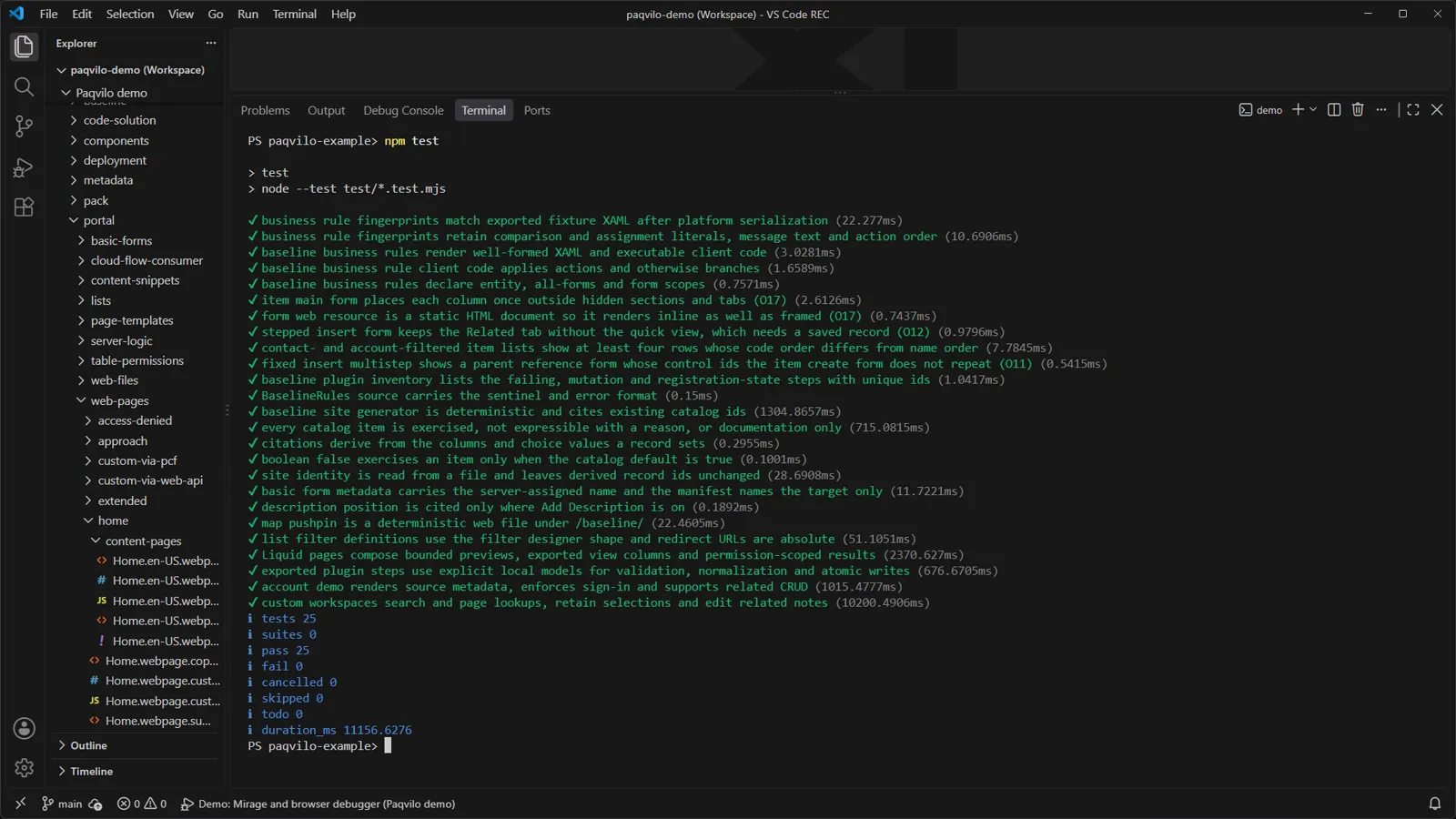
The recording's run: tests 25, pass 25, fail 0.
Do In the demo folder, run npm test (or the VS Code task demo: Run acceptance tests).
You see Node's built-in test runner (node --test test/*.test.mjs) lists business-rule fingerprints, the plugin inventory and the baseline site generator, and tests such as "account demo renders source metadata, enforces sign-in and supports related CRUD". The summary lines count tests, passes and failures.
Why None of these tests needs npm run dev. Each one that touches the portal starts its own Mirage in the test process with createSimulator({ sourceDir, solutionRoots, dataPacks, port: 0, watch: false }), renders the same export, Solutions and pack you browse, and closes it when done. Portal routes take identity only from the session cookie, so tests sign in by getting that cookie: signInHeaders(simulator, contactId) returns a cookie header for fetch(), and signInContext(context, simulator, contactId) signs a Playwright browser context in. The demo's portal test signs in as the editor and as the reader and expects HTTP 403 when the reader tries to create a contact.
Check In your own tests, import from the supported entry point paqvilo/mirage/testing. It also offers connectRuntime() for a runtime that is already running, createPersonaSession() for persona-catalogue identities, and createPortalSession() and runSessionMatrix() to give many visitors their own cookie jars against one runtime. Keep these tests in your portal project. A passing local run does not establish platform parity.
Put two offline gates before every merge
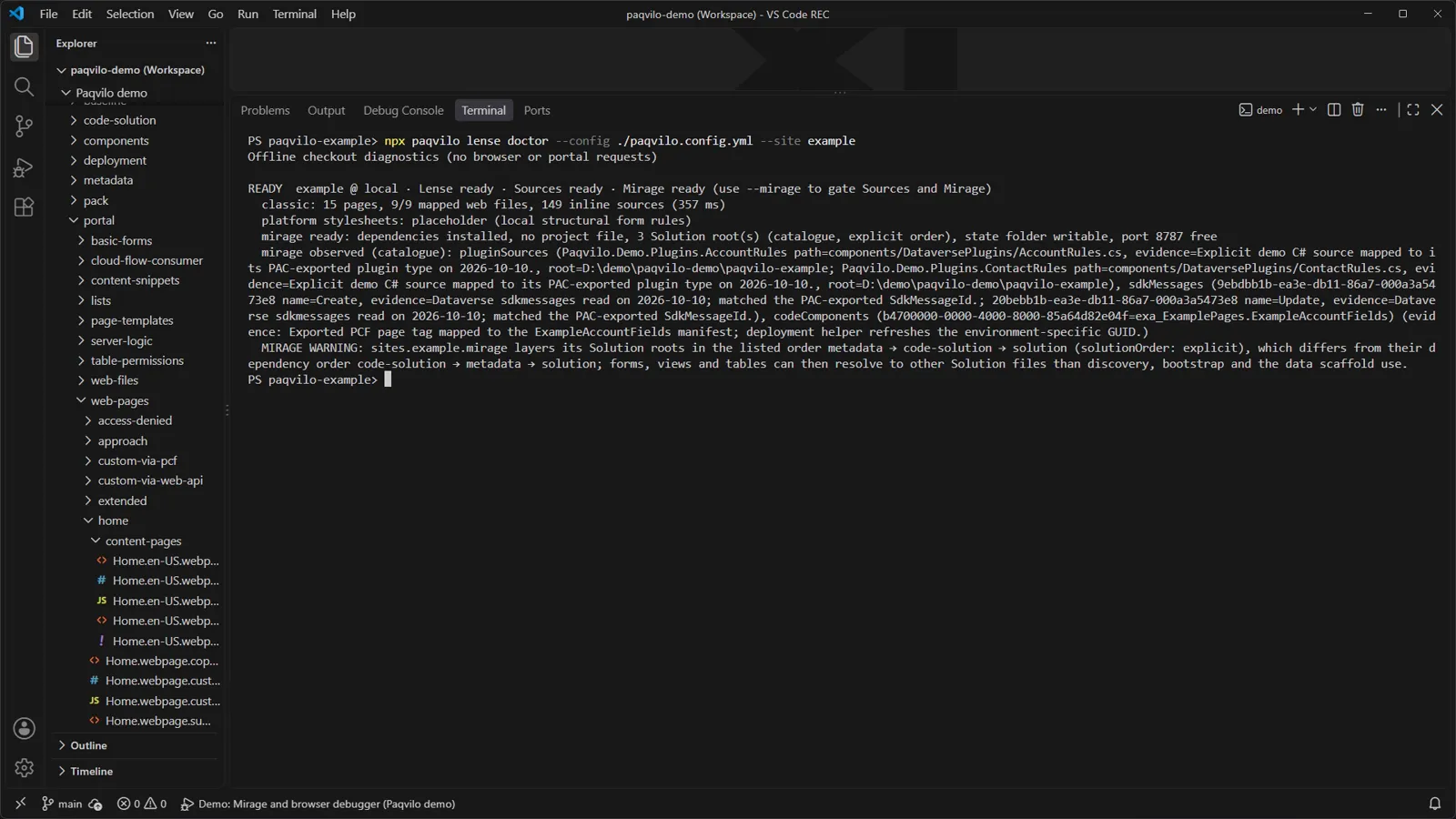
lense doctor: ready, with one warning about the Solution root order.
Do
npx paqvilo lense doctor --config ./paqvilo.config.yml --site example
npx paqvilo lense audit --config ./paqvilo.config.yml --all --strict
You seedoctor starts with "Offline checkout diagnostics (no browser or portal requests)" and reports READY example @ local · Lense ready · Sources ready · Mirage ready: 15 pages, 9 of 9 mapped web files, 149 inline sources, installed dependencies, three Solution roots, a writable state folder and a free port. It warns that the demo layers its Solution roots in an explicit order that differs from their dependency order; the demo sets that deliberately with solutionOrder: explicit.
Whydoctor checks configuration, source mapping, Solution inputs and the baseline; on its own its exit status covers Lense, and --all --mirage makes it gate on Sources and Mirage too. audit inventories every exported resource independently of the mapping Lense uses and exposes blocked or unaccounted code. With --strict, any blocked resource, gap or diagnostic fails the command with the JSON code strict_failed. deployment marks files the overlay cannot apply, such as server logic; disabled counts mapped resources this target does not currently route.
Check The audit's first line says it: mapping does not prove browser coverage. "Mapped" means the export names a local response Lense could serve, not that a page requested it. Evidence that a change applied comes from a browser: the panel, lense verify or the agent API. A minimal CI job:
- run: npm ci
- run: npx paqvilo lense doctor --config ./paqvilo.config.yml --all --mirage
- run: npx paqvilo lense audit --config ./paqvilo.config.yml --all --strict
- run: npm test
Browser tests need a browser on the build agent that Playwright can launch.
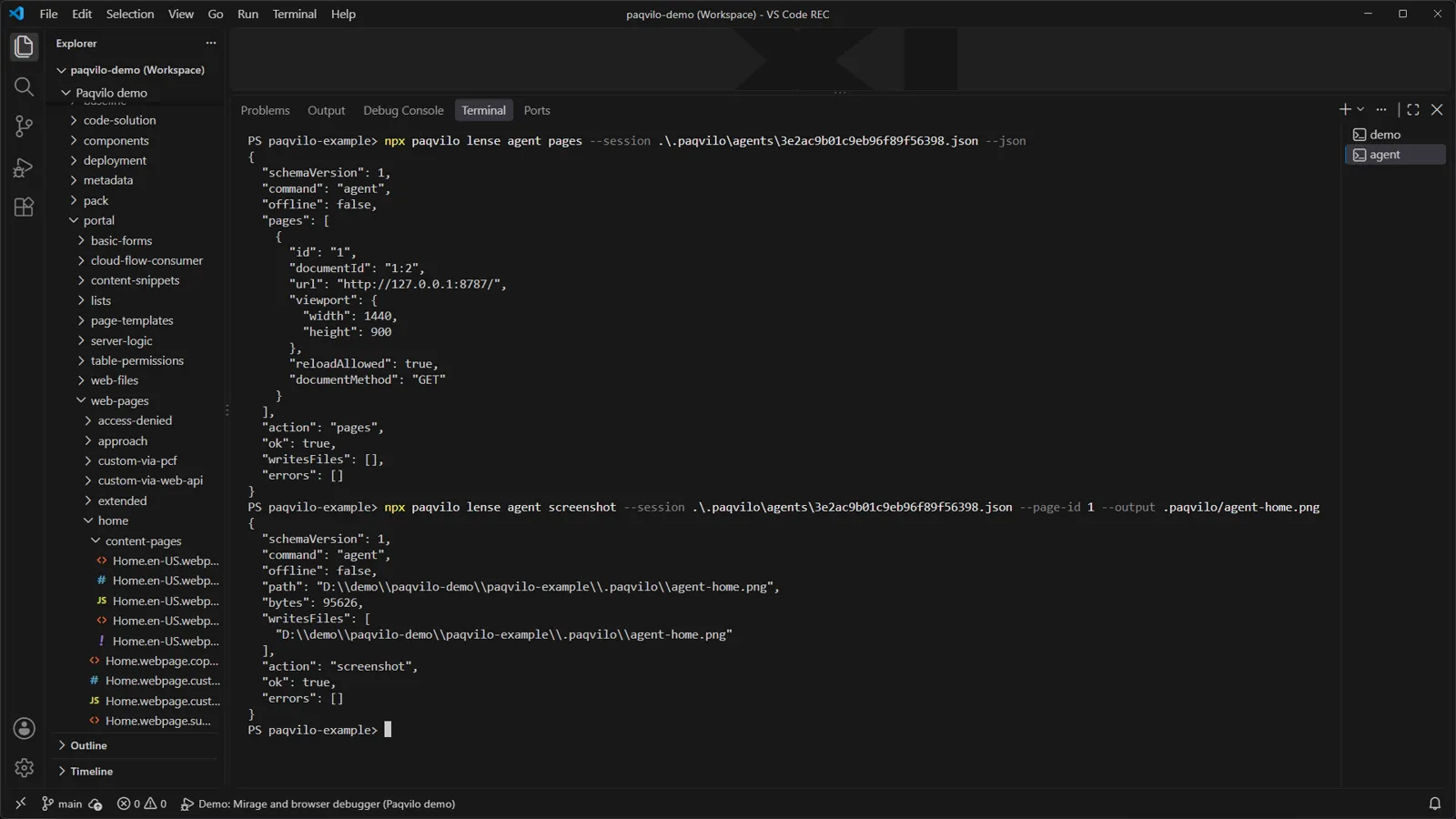
Give a coding agent a bounded handle
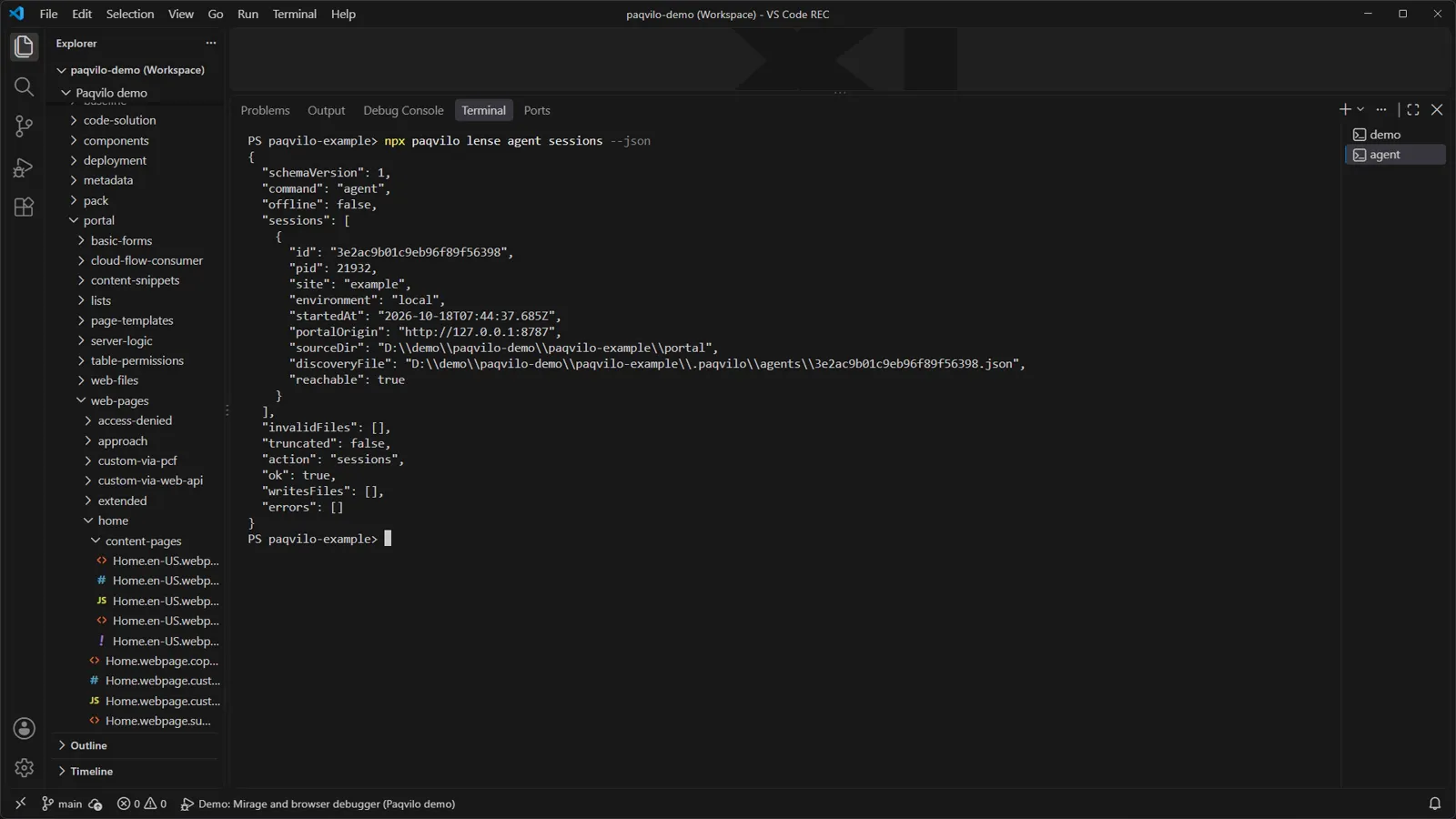
agent sessions: one reachable session, no token in the output.
Do Run a headless Lense session in one terminal (npm run lense -- --headless in the demo) and use a second terminal as the agent:
You seesessions lists each discovered session with id, site, environment, portalOrigin, discoveryFile and reachable: true (the CLI called the session's status endpoint and got the same ID back). status returns readiness, Git, baseline and the overlay without the token. pages lists page 1 with documentMethod: "GET" and reloadAllowed: true. screenshot writes a new PNG and names it in writesFiles.
pages, then a screenshot into the ignored .paqvilo folder.
Why When lense dev owns its browser, it starts a small HTTP server on 127.0.0.1, generates a session ID and token and writes a discovery file to .paqvilo/agents/ with owner-only permissions; an attached, user-owned browser gets none. The CLI sends the token as an Authorization header to a loopback endpoint only, and the server rejects anything that looks like a browser request. The API is confined to the portal origin: navigate performs a GET on a portal path, reload works only on an observed GET document, and there is no evaluation, form-action or arbitrary proxy endpoint.
Check Never print, copy or commit a discovery file: it holds the bearer token. Read events with agent events --after <n>, pass nextSequence as the next cursor and report anything dropped. screenshot never overwrites; choose a new name each time. Page IDs are browser IDs and differ from the offline resource IDs that lense resources returns. In Lense, the agent's browser uses the online backend: use authorised environments only. For structured Mirage automation, use lense mirage start with the agent API; interactive mirage dev has no JSON output.
REFERENCE / EXTEND
Business behavior stays in your project.
Keep your portal and its business behavior in a separate repository. Install Paqvilo as a dependency, register your pack and run your own tests from that project.
Data packs
Trusted JavaScript modules registered explicitly in mirage.dataPacks, defaults.mirage.dataPacks or a Mirage project's dataPacks. A pack exports id, matches({ portal }) and presets() with tables and mappings, and may add plugin steps, server logic, cloud flows, endpoints and configuration presets. Mirage itself ships only empty-local, open-sandbox, strict-permissions and contact-demo.
Use when generated rows are not enough for realistic scenarios.
A pack's personaCatalog groups contact-derived identities with labels, tags and scenarios; roles and accounts still come from the contacts and the export. Sign in through the local sign-in page, Tweaks or /_sim/. The demo's editor and reader picker is one.
Use to test permission scopes and protected pages locally.
Deterministic dataset generators. Without a pack, mirage data scaffold creates smoke or dev rows from metadata; a pack's generators run with mirage data generate --pack <id> --pack-module ./pack/pack.mjs --profile deep and --count NAME=N.
Use for repeatable sample data, including IDs and relationship links.
A scaffold includes pack tests, support/mirage.mjs (binds your packs through createMirageContext) and per-site test-browser/fixtures/<site>/. npm run validate runs unit and browser tests. Running acceptance and parity plans never authorizes live writes.
Use for repeatable business scenarios before validating the deployed result.